WhatsApp Business
20 min
The ultimate guide to WhatsApp for Business




This guide contains the basics of WhatsApp Business: learn how to use this channel effectively within every step of the customer journey. Prefer to read it offline? Download the guide as a PDF.
Customer behavior has changed immensely due to the Covid-19 pandemic. Globally we’ve gone from living offline to online. We had to adapt quickly, but it seems we were readier for it than we thought. Organizations discovered many advantages of doing business online. It is quick, efficient, personal and easy, and we don’t have to get off our butts to get what we want. This transition has been much easier thanks to a communication channel many of us already use: WhatsApp. Over two billion people use WhatsApp to send over 75 billion messages every day.
Automations, artificial intelligence and analytics enrich the use of WhatsApp and the implications for business all over the world. At Saysimple, we help integrate these smart features, which help relieve the pressure of customer contact and reduce costs for your business.
Now, we are heading towards the postpandemic world where many of us can’t wait to go out again. However, consumers have gotten used to a new way of shopping where things get done quickly and easily. It seems the mobile-first shopping experience is here to stay. Therefore, businesses need to get ahead of the game by upgrading their customer experience strategy to meet the quality standards of the new world ahead of us.
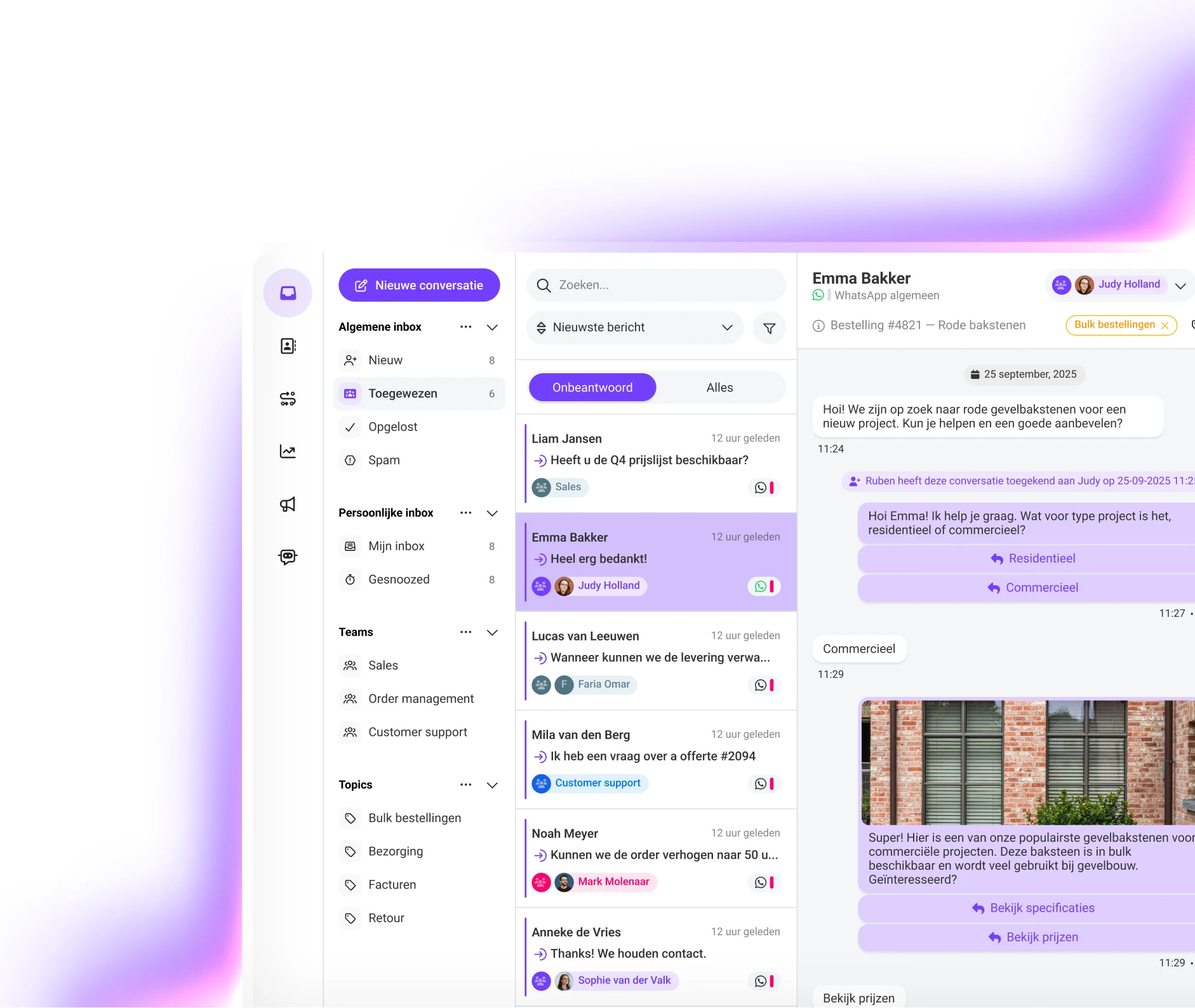
WhatsApp is known as the straightforward messaging app owned by Facebook. This commonly used app is targeted at the consumer, which is why the messaging giant developed a solution for businesses as well. While small businesses are able to simply download the WhatsApp Business app, WhatsApp has developed a scalable API for medium to large businesses.
WhatsApp Business empowers brands to improve their customer experience. The API allows for one-to-one interaction with customers at scale. The WhatsApp Business API represents an ideal solution for a deeper level of customer care and offers opportunities for sending proactive notifications. Other features developed for companies are automated responses like greeting or away messages, as well as the option to list useful information such as opening hours and locations.
The implementation of WhatsApp Business reduces pressure on your customer service team, increases sales and removes friction within the purchase process. As a business, you can use your verified WhatsApp Business profile as an extension of your brand and earn recognition and trust from your customers.
WhatsApp is very accessible and user-friendly, which is why many businesses use WhatsApp Business to increase customer satisfaction and lower the pressure on their customer care team.
Other than being an efficient communication channel, WhatsApp Business improves customer experience and therefore your business. How? We’ve listed 5 benefits.
WhatsApp Business has created a few specialized features for businesses to add extra value to their service.
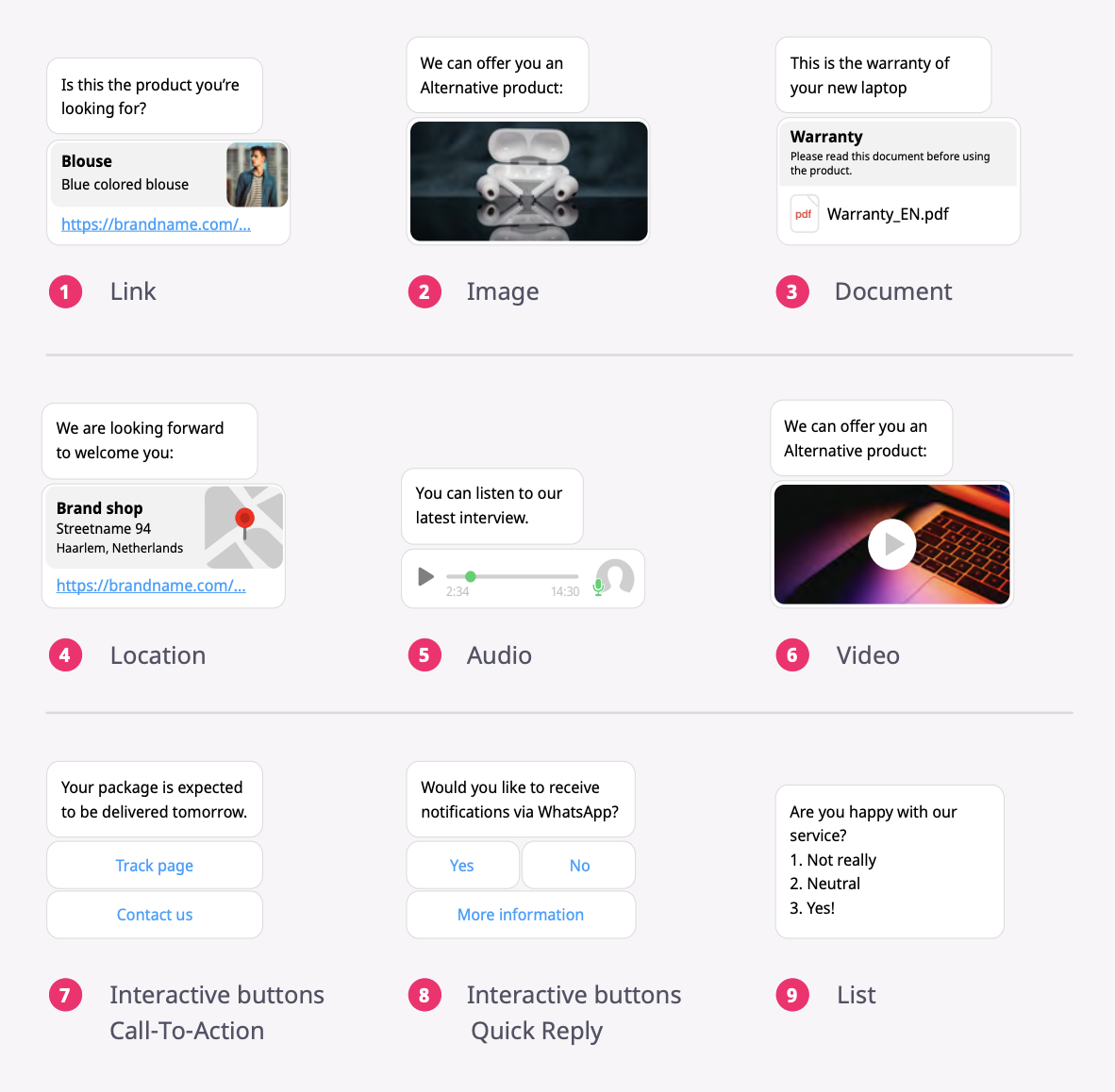
Within WhatsApp Business you can easily choose from multiple content types to share with your customer.
The WhatsApp Business API is the gateway to better customer communication. Companies will improve customer engagement, and it will help them gain trust and create long-term relationships with their customers. Working with WhatsApp Business will help you:
Offer always-on support and send useful notifications with Saysimple as your WhatsApp Business solution partner.
Customers want to connect with businesses on a familiar platform that is fast and reliable. WhatsApp is the most used channel for consumers worldwide, and 90% of those customers say they want to engage through messaging. This makes WhatsApp the ideal channel for businesses to be where their customers are.
Businesses using the WhatsApp Business API can communicate with their customers in two ways:
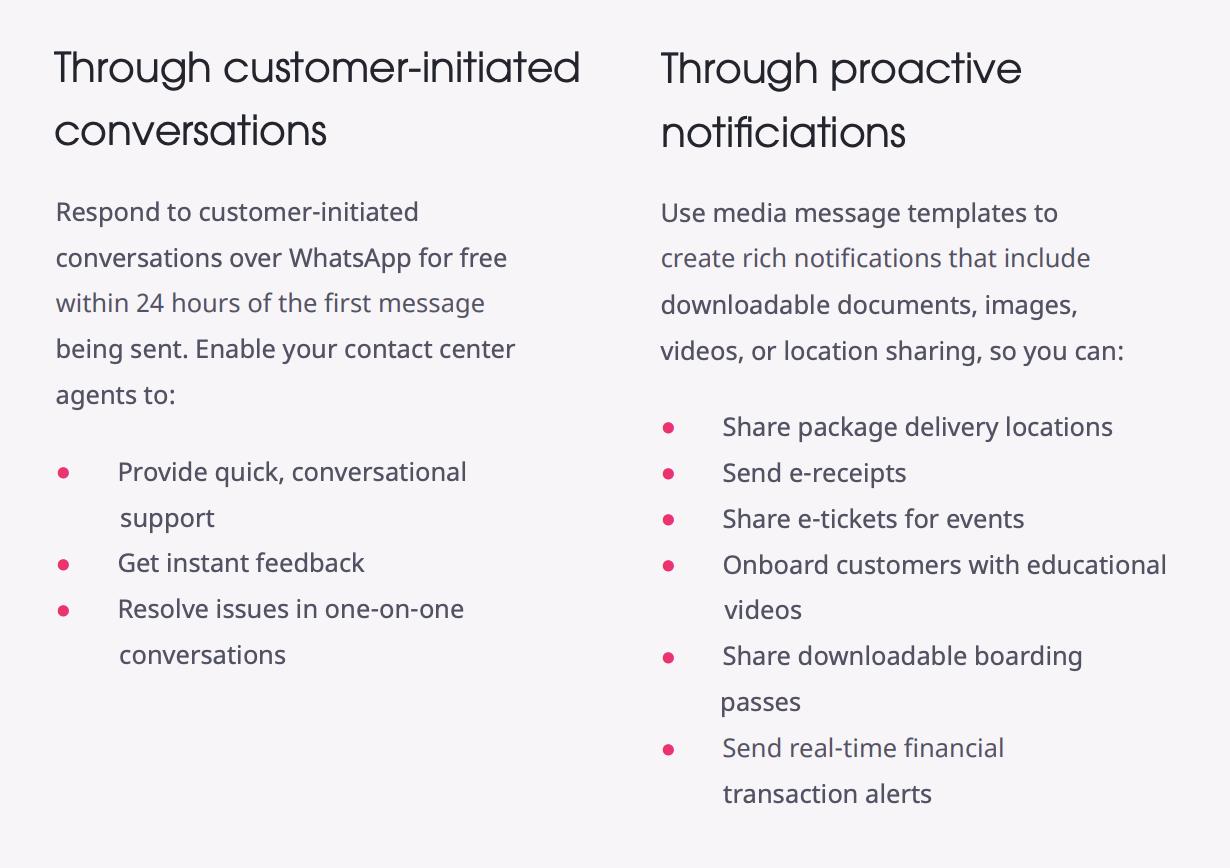
A WhatsApp message template gives businesses a way to proactively reach out to their customers. You can create different message templates, depending on your business needs.

Once your interactive message templates have been created and approved, you can use them in notification messages as well as customer service messages. There are 2 types of predefined buttons:
When a customer replies to one of your messages, a 24-hour support window opens. During that time you can freely and authentically communicate with that customer without using WhatsApp-approved message templates.
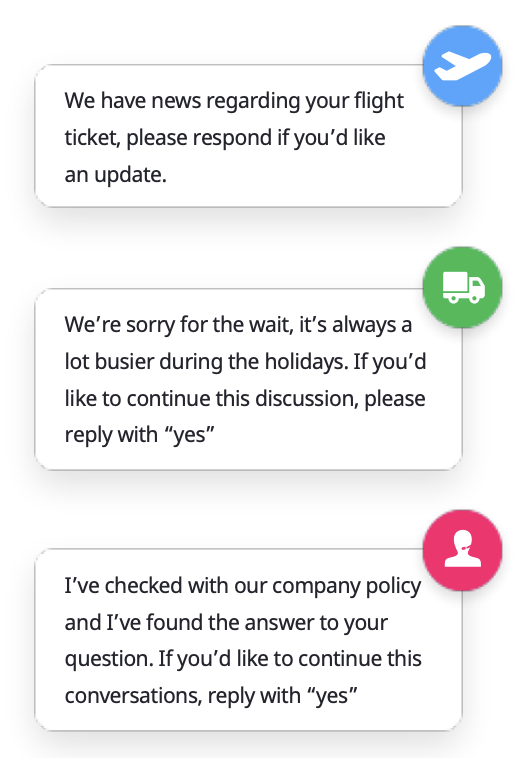
When responding during the 24-hour window, WhatsApp allows businesses to use automation, but only if an escalation path leads to a customer care agent. Escalation paths include a phone number, email, web support or a support form, among other things. There may be cases, especially when you’re using WhatsApp for customer service, that you need more than 24 hours to process an inquiry or answer a question. When this happens, you might need to send a message template to re-engage with that specific customer, prompting them to answer it and thereby activating the support window again.
To handle a situation like this, you might consider creating template messages like this one:
Opt-ins play a crucial role in WhatsApp business-to-customer interactions, and they must be active. That is to say, they must be triggered by user actions like entering a phone number or checking a box to indicate consent. This can be done on any channel that your business uses to communicate with customers: your website, app, email, SMS, retail location and so on.
It is your responsibility to collect and store customer opt-ins, ensuring that every customer you communicate with on WhatsApp Business has agreed to receive messages from your business. This even includes existing customers, who have to explicitly agree to receive WhatsApp messages from you. Below, we explain and give best practices for using opt-ins.
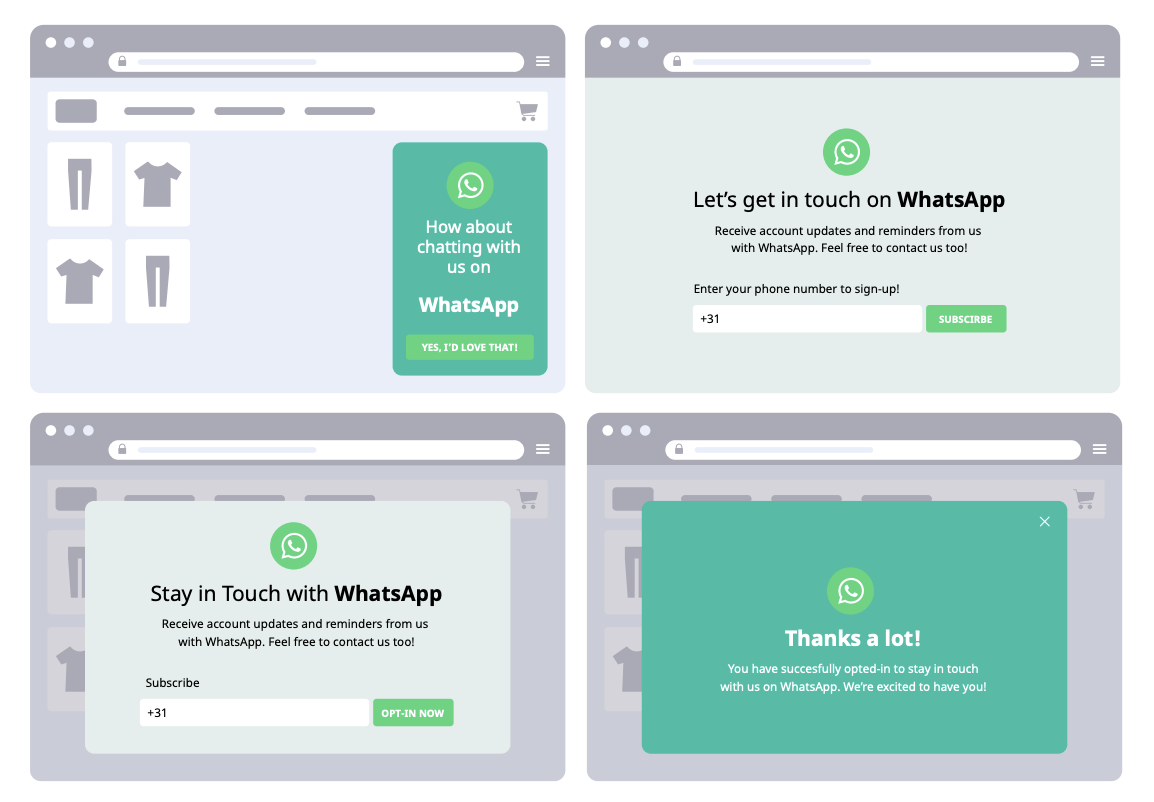
Let’s start with how to collect opt-ins. The important thing is to make opt-ins easy and accessible, and to explain to customers how your company uses WhatsApp.
Your customers already want to talk to you on WhatsApp, so promoting the app on your relevant customer touchpoints will most probably increase your subscribers. Make sure you clearly communicate how you will use this channel (remember, no spam!) and make your opt-in simple for your customers and staff.
It’s essential to stick to your use cases and make this channel relevant for your customers. Your team should be ready to take messages from your customers without hesitation! Make sure you set guidelines on how your agents will support your customers on WhatsApp to sustain and boost your growth.
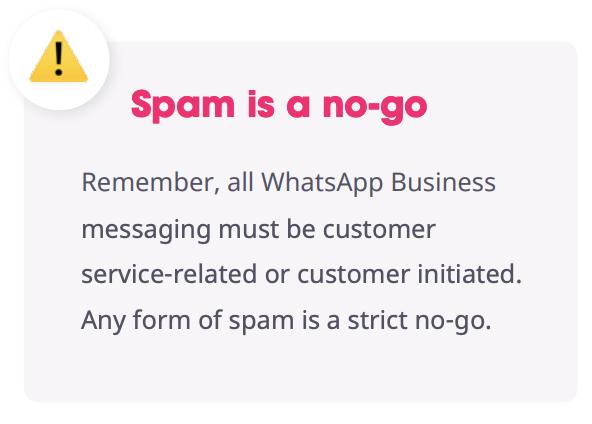
Here is a simple set of guidelines on how to gather opt-ins.
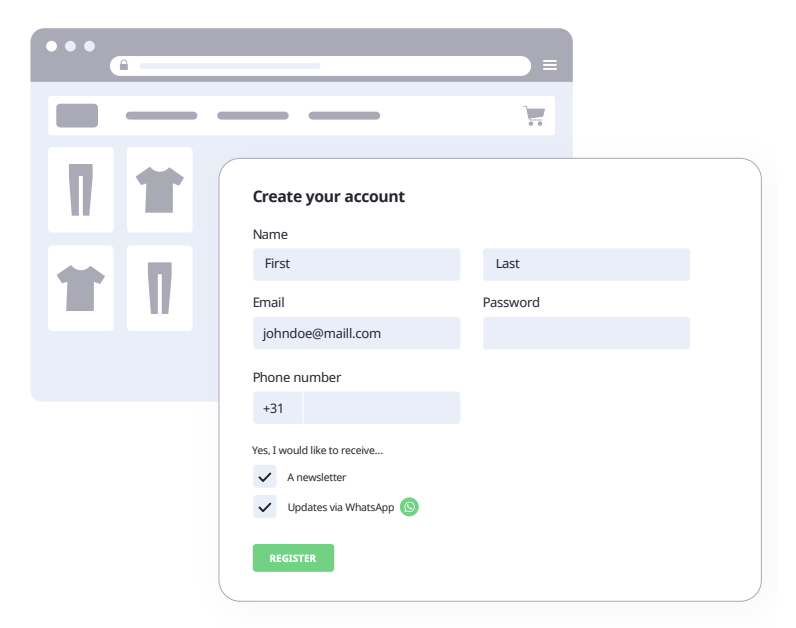
Today’s customers gravitate toward trustworthy brands that deliver personalized and frictionless experiences. Unfortunately, businesses at corporate and enterprise level have a serious problem when it comes to trustworthiness: a majority of customers don’t trust them to securely manage their data or respect their privacy. For instance, 68% of consumers feel concerned about their security on the internet. Most of them are nervous about banking and financial transactions and online shopping.
Here are four solutions to your customers’ privacy concerns.
With WhatsApp Business your entire customer journey can be conversational: from the discovery phase, to the purchase phase, to the post-purchase phase. By using your messaging channels effectively, you will acquire, support and retain loyal customers. During the customer journey you want to reduce friction where possible. A cohesive customer experience across the whole customer journey is imperative!
The key thing is to focus on how WhatsApp can help your business:
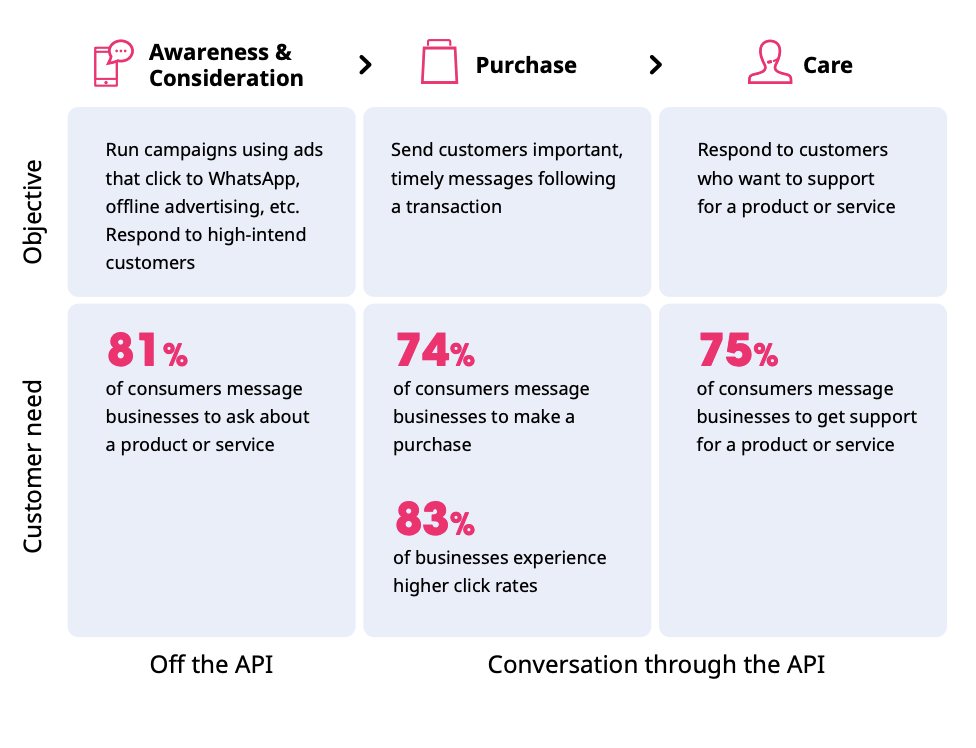
Consumers expect a smooth experience and outstanding support across every stage of the customer journey. In the discovery stage, customers discover the brand and its products, and expect to find clear, concise and relevant information across all channels. This phase is important for customer engagement, considering that over 81% of consumers want to contact the company to ask about a product or service prior to purchase.
WhatsApp Business offers a user-centric channel where the customer drives the conversation, not the business. That’s why there’s no point in spamming customers with product information just because the company has seen some website activity from that individual. Instead, companies can add easy, non-intrusive WhatsApp conversation starter buttons to key content, which lets customers get product information at their own pace.
The main friction point in discovery is finding information on relevant products without a helping hand. While shopping online, customers can easily become overwhelmed by the sheer volume of product options. WhatsApp Business helps personalize interactions to reduce friction in the discovery phase.
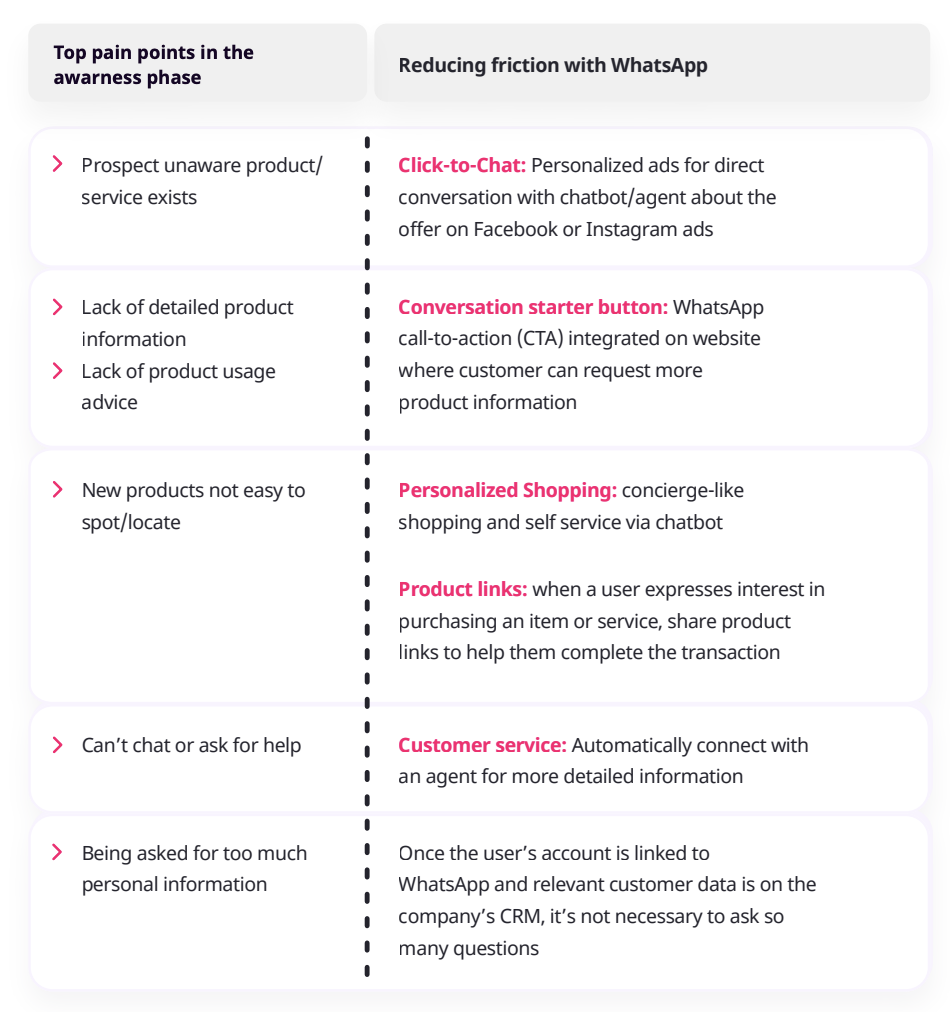
How WhatsApp reduces friction for the main pain points in the awareness phase (pain point information from Facebook IQ). Finally, to optimize CX we recommend mapping out your business’ customer journey, checking which customer channels are currently used and creating an overview of the pain points inside the journey.
When considering WhatsApp Business, you need to find out how communication channels can add value to your company. You can also decide to add WhatsApp Business to your existing channels or slowly replace them.
Following these steps will help you gain insight into your current customer journey, and it will show you how WhatsApp Business helps reduce friction. In the end it should result in higher customer engagement and increased sales.
The purchase stage might be the trickiest phase in the buying process. Long wait times, clunky or inefficient point-of-sale systems, multiple web forms and transaction failures can make the path to purchase unnecessarily cumbersome.
As consumers consider which products they want, any number of factors can keep them from completing the purchase: unclear delivery options, shopping carts that don’t save items, hidden charges or too many clicks to finalize a purchase. It’s no wonder that abandoned shopping carts remain a key issue in online shopping. After the consumer has become aware of the products and considered them by adding items to their cart, they don’t follow through to checkout.
How can companies prevent purchase friction to convert sales faster? Over 74% of consumers already expect to make a purchase via a social messaging app. There are areas where WhatsApp has no influence, like how checkout processes are built, but the messaging application is perfect for proactive communication: helping customers find the information they need, such as shipping costs, and providing automated, conversational shopping experiences that simplify the purchasing process.
WhatsApp-powered personalized shopping is on the rise. The trend is triggered primarily by mobile-first shoppers, largely Generation Z and Millennials, who are falling out of love with traditional touchpoints such as websites and email. Instead, they are demanding a more personalized service delivered to their smartphones via messaging. Personalized shopping or a product finder helps customers in their request for a more personalized service.
For retailers, the deployment of conversational commerce will help deepen customer relationships and compete with businesses that are still using traditional CX channels. From fashion ecommerce and cosmetics retail to sourcing everyday household items, customers can request information and order goods using their preferred messaging platforms. Personalized buying journeys are powered by chatbots for simple requests, or by human agents acting as personal shoppers for a more bespoke service.
For consumers, a product finder can help filter the otherwise overwhelming sea of choices based on their preferences in a conversational setting. Shoppers can avoid browsing through hundreds of pages and instead see the products they are interested in quickly and efficiently.
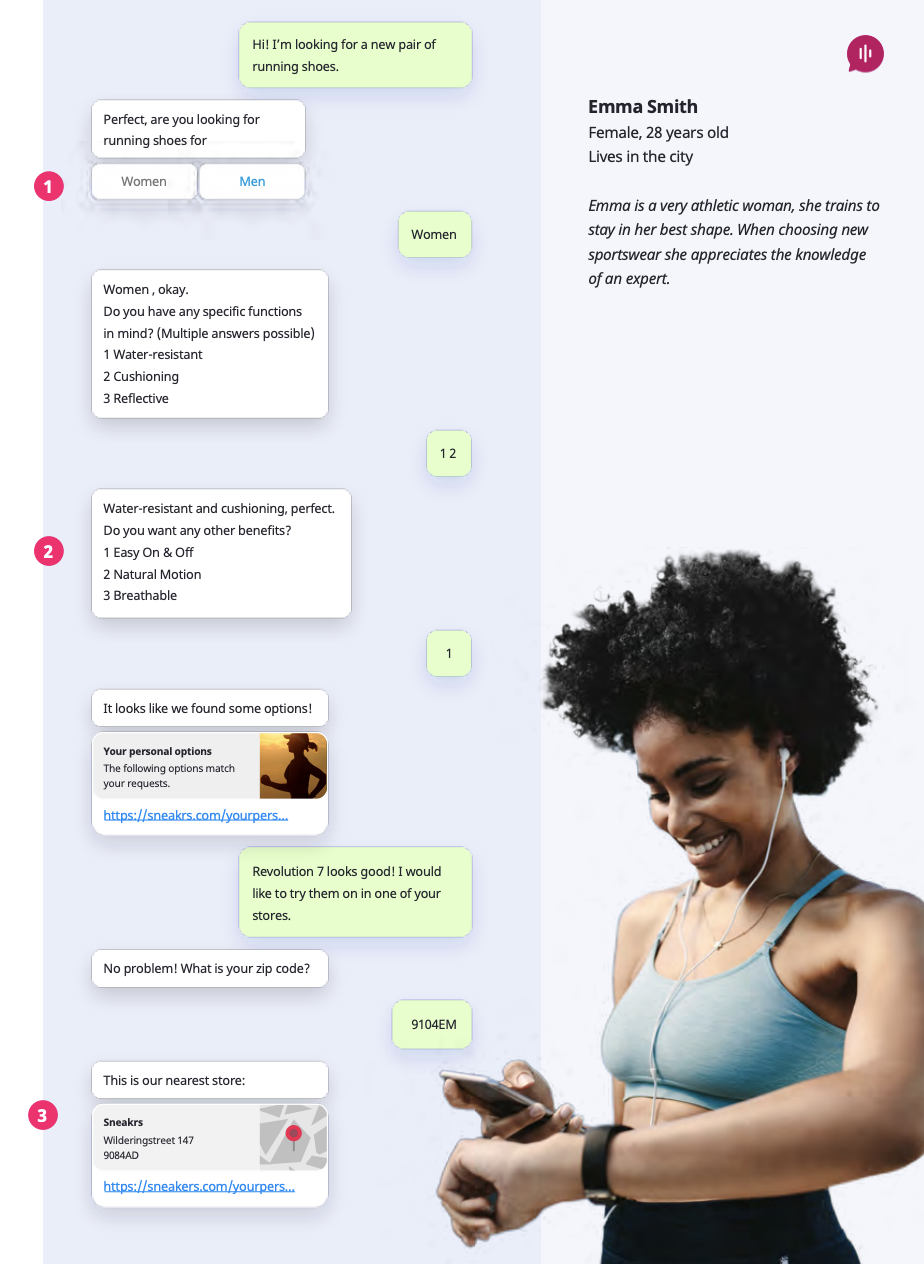
Example 1: guided selling with WhatsApp. Not everyone has time to browse all your product choices. Interactive buttons (1) and lists (2) are a great way to narrow down choices and help Emma get what she needs. By showing where she can purchase shoes (3), Emma has everything she needs to buy the running shoes she wants.
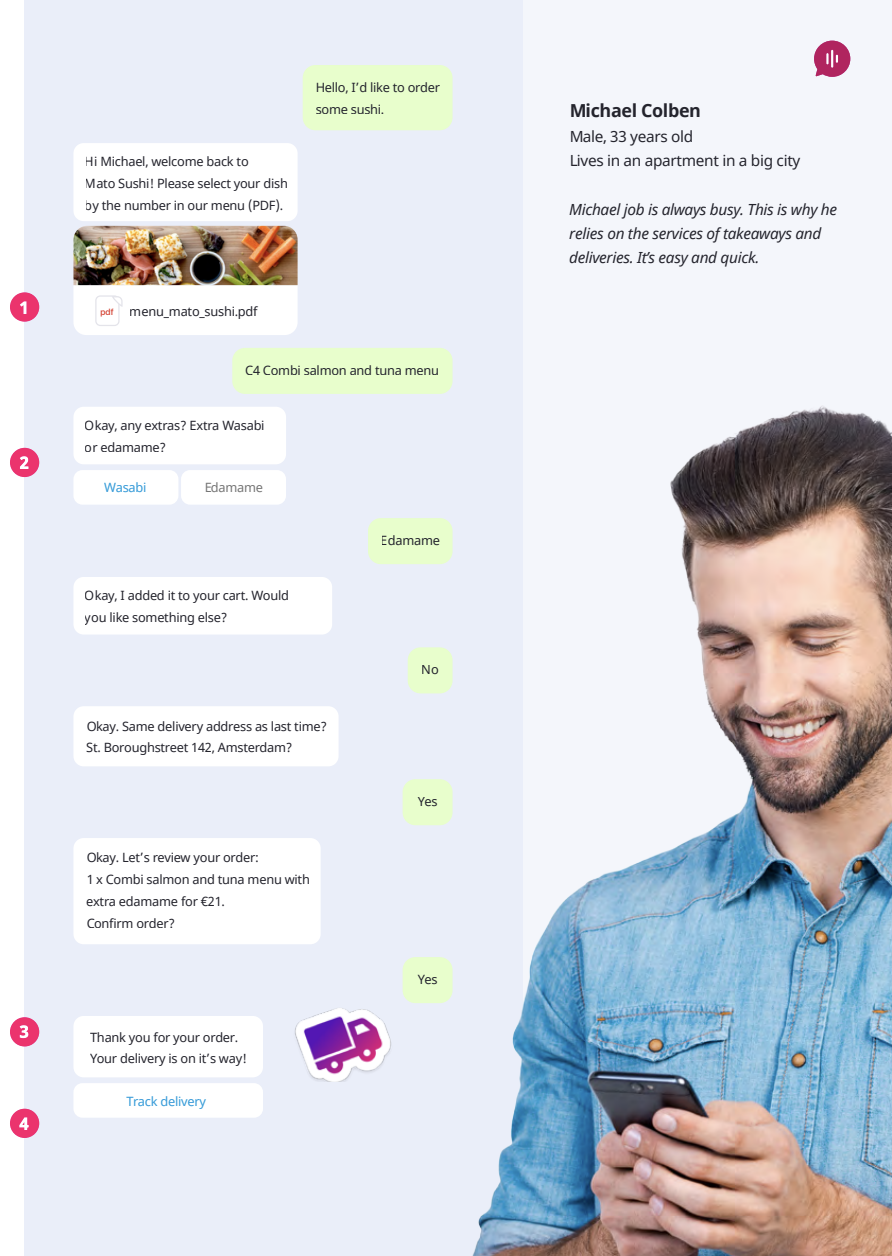
Example 2: order via WhatsApp. With WhatsApp, ordering food is simple. Restaurants can share the menu as a PDF (1) or URL, customize the order with extra information via interactive buttons (2), confirm the order (3) and track delivery (4). All of this with a personalized connection using media and branded stickers (5).
WhatsApp Business is a two-way communication channel that lets customers ask questions right away in the chat app, instead of sending an email or calling the contact center. It also means that companies can send time-sensitive messages that the customer needs to check right away, replacing existing email content such as order or shipping confirmations.
Being a two-way street, it is possible for companies to engage with the customer and provide extra useful information in the conversation, such as order and payment details, delivery updates and tracking URLs.
This means that the order confirmation message can be more than a “Thank you for your business”: it can be an overview of the purchase.
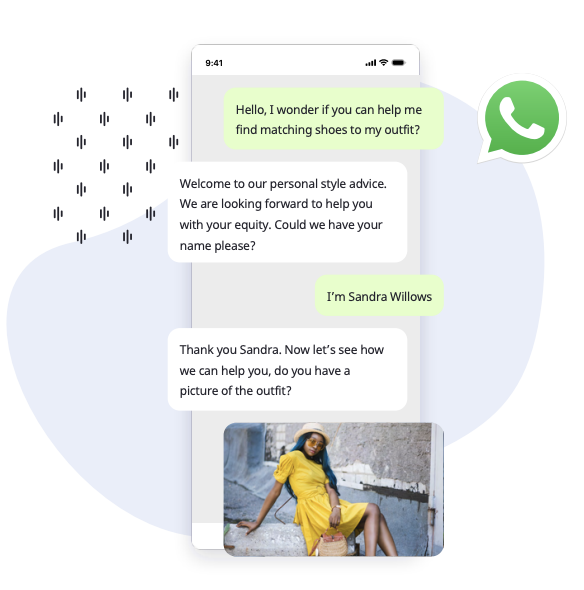
Messaging is a clever way of engaging the customer right away and opening an actual channel of conversation, instead of sending an email that probably won’t be opened or read (remember: only 25% of emails are opened). The same principle applies to other kinds of notifications about the customer’s order, like order cancellations or any other related changes.
In case of an order cancellation, the notification can be sent automatically when the customer or shop owner cancels the order. The customer may receive a list of which products were cancelled, and the message could also explain how the payment will be refunded.
WhatsApp gives Crisp the opportunity to interact quickly and personally with its customers, and makes it possible to remove friction at various points in the customer journey.
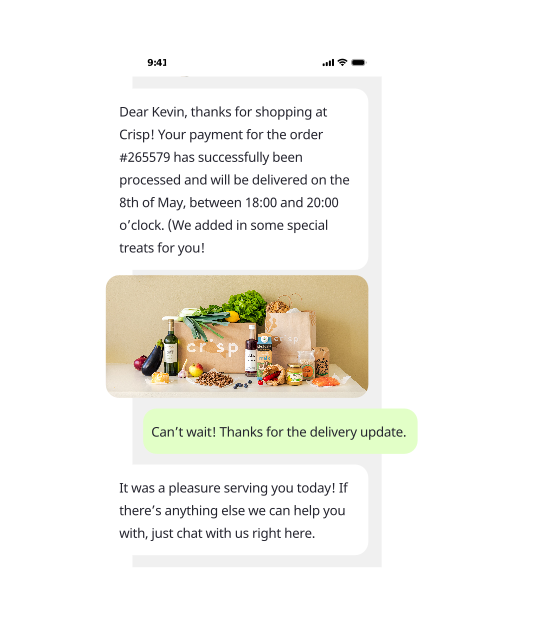
Crisp is also a high roller when it comes to WhatsApp templates. They use WhatsApp templates to manage customer expectations by sending proactive notifications about order updates and delivery. And if something is wrong after delivery, customers can easily take action by getting in touch via WhatsApp.
Once payment is completed, consumers expect rapid fulfillment and status updates, including purchase information and delivery timeslots, and support for their product or service. Post-purchase friction occurs when consumers experience unexpected barriers to receiving products or services, or are unable to easily access the guidance needed to use or repurchase the product.
No matter the industry, post-purchase customer service is essential for sustainable growth. When consumers face difficulties with a newly purchased product or service, such as struggling with delivery tracking, missing packages or even damaged items, a proactive communication strategy must be in place.
Just as it is important for consumers to shop and browse on their own terms, it is equally vital for consumers to be able to return their purchases easily and to be rewarded for their loyalty.
WhatsApp Business is a great fit for customer support: over 75% of consumers want to get product or service support via messaging. Companies can handle a wide range of use cases, from complaints to proactive notifications that keep the customer up to date every step of the way, helping to reduce costs and increase customer service efficiency.
WhatsApp makes it possible for:
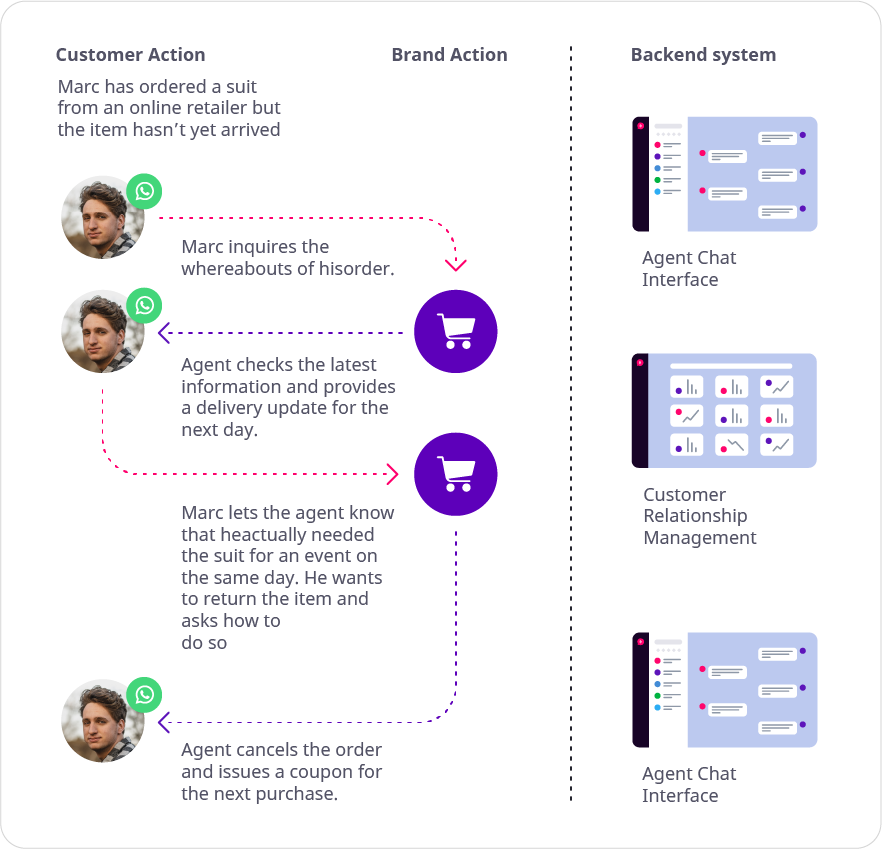
Most brands get it by now: creating a delightful customer experience is key to their success. Today, customers demand service how, when and where they want it. According to market analyst Gartner, “a superior CX is one of the few remaining means of sustainable competitive differentiation.” Customers want a cohesive, frictionless experience, regardless of their channel of choice.
Customers don’t want to call companies for support, and they certainly don’t want to navigate tortuous IVR systems. They just want answers via their preferred channel, the place where they can get a quick response to their questions, as shown in the example where Marc wants to know where his suit is. WhatsApp accelerates the uptake of chat messaging as a customer service channel.
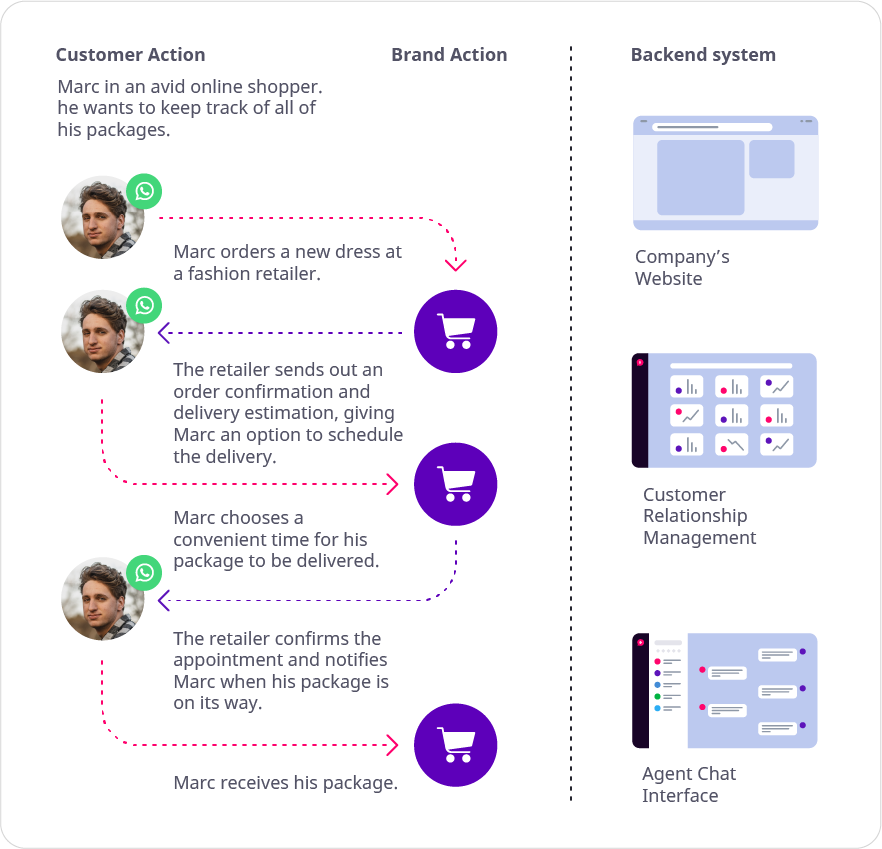
While shipping notifications have become standard practice for companies selling products and services online, scheduling appointments for parcel delivery can still be hard. With WhatsApp, companies can easily handle parcel appointment scheduling, from booking to cancellation and rescheduling, whenever needed.
Appointment scheduling and updates can also be applied to a service. For example, automotive dealers can send inspection reminders to drivers, inviting them to book a service such as a car inspection directly on WhatsApp.
From there on, customers can get information about the inspection costs and timeframe while scheduling the appointment directly on WhatsApp.
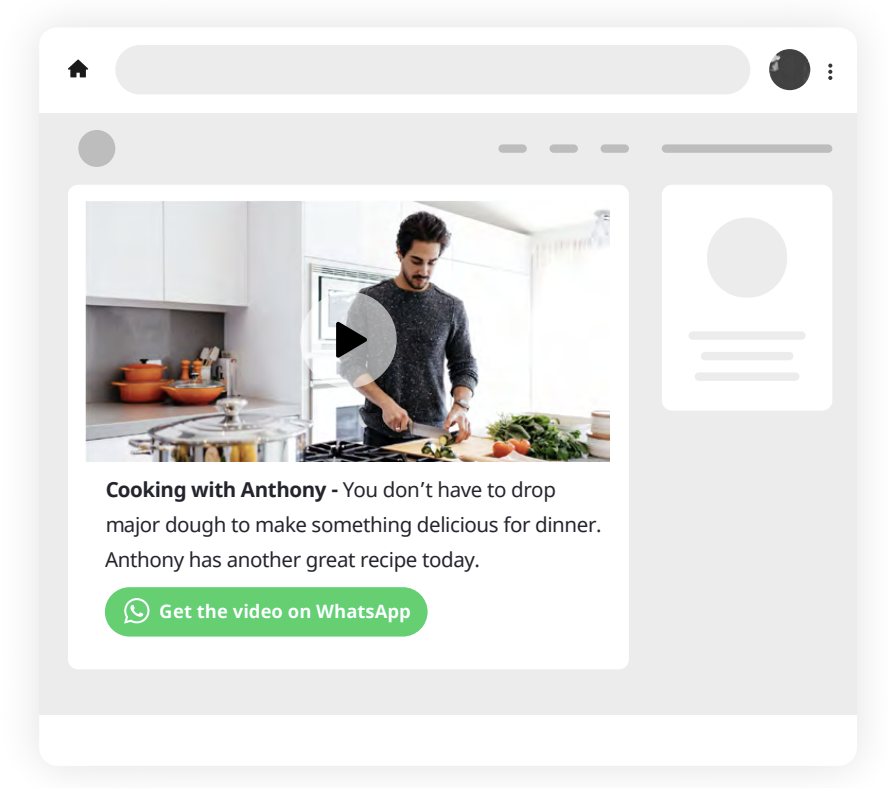
Like in the discovery phase, where customers want to receive product information on WhatsApp, companies can apply calls to action (CTAs) on their websites in the post-purchase phase. CTAs are curated content to engage new and existing customers. It is a place where customers can interact with your brand and buy your product.
A CTA button on the website leads the consumer to WhatsApp. This is a great way to engage with customers who need more personalized information from a brand, such as tips, fashion advice, tutorials and more. While it’s not permitted to broadcast newsletters and unsolicited content on WhatsApp, it is possible to use WhatsApp for what it is: a user-centric channel where consumers receive videos and tips without friction, as shown in the example.
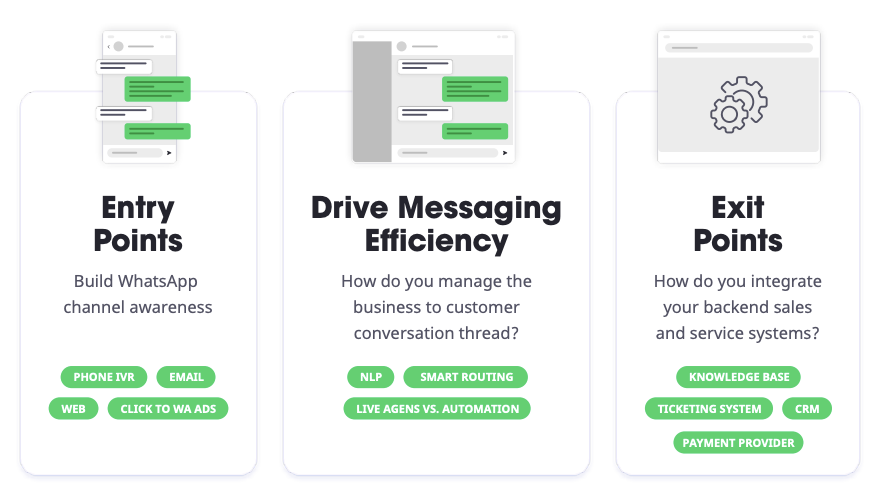
Now that we know how WhatsApp Business works and how it pays off in the customer journey, it is time for companies to start building WhatsApp entry points in different places. Companies need a strategy to let customers know this new channel is available for every step in their journey.
To create awareness for the new messaging channel, we encourage companies to get creative in spreading the news that customers can use WhatsApp to talk to their business. Here is a quick overview of how companies can create awareness via paid and organic methods:
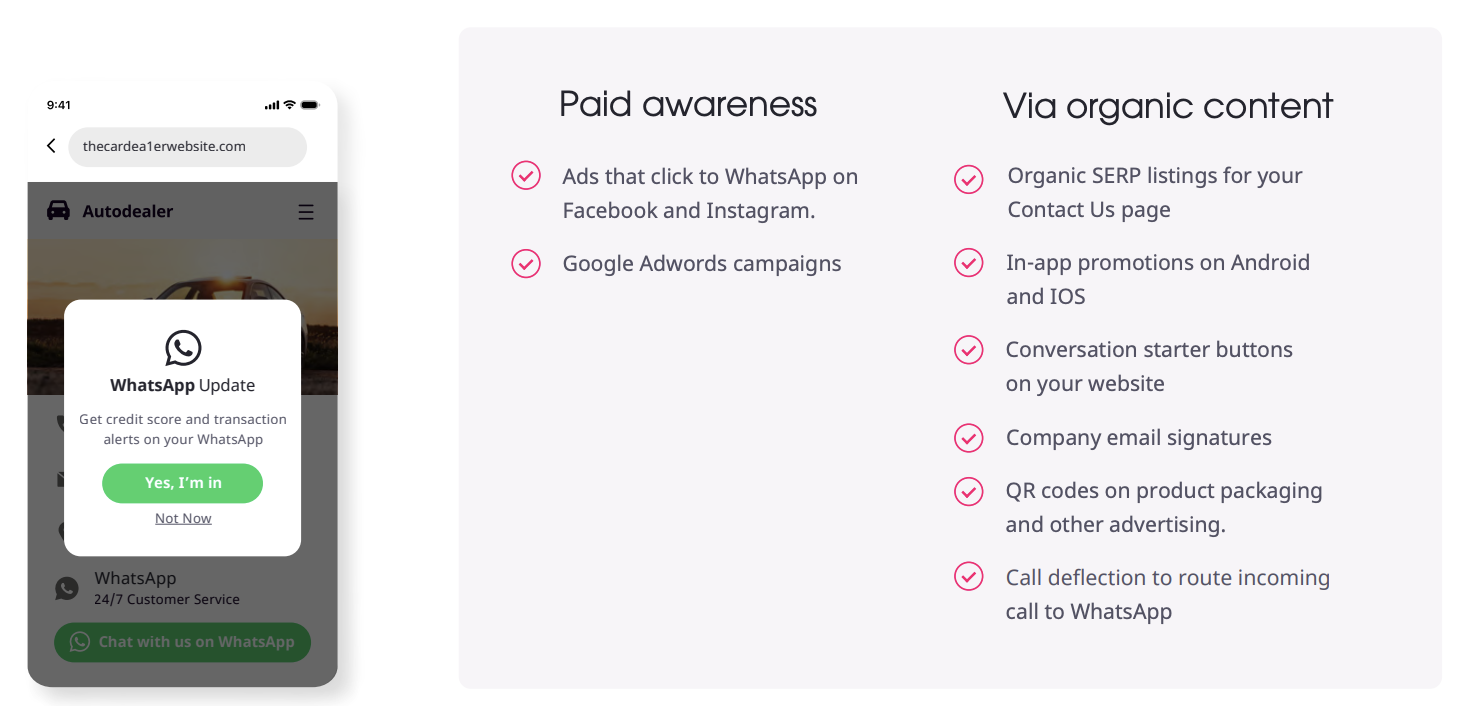
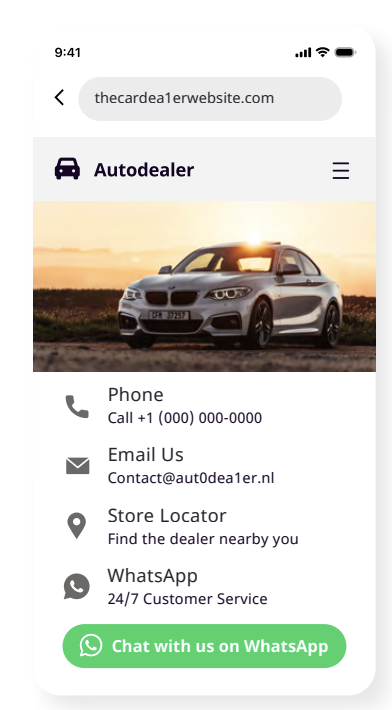
To initiate a conversation via WhatsApp, a company should integrate conversation starter buttons on its website. With these entry points, a website visitor can simply click a button to request more information about a product, or to get relevant content like tips, tutorials and advice. On the agent side, when the customer clicks the “Chat with us” button, the customer’s phone number is collected and a link is created that starts a chat with them. By clicking the link, the chat opens automatically.
Fortunately, adding a click-to-chat button is as easy as you would imagine. This function works with wa.me links. Your company can create its own link using https://wa.me/<number>, where <number> is the full phone number in international format.
After creating your own link, you can design it as a button and use it on your website. To best assess where to place these conversation starter buttons, review your monthly traffic and decide on targeted placements.
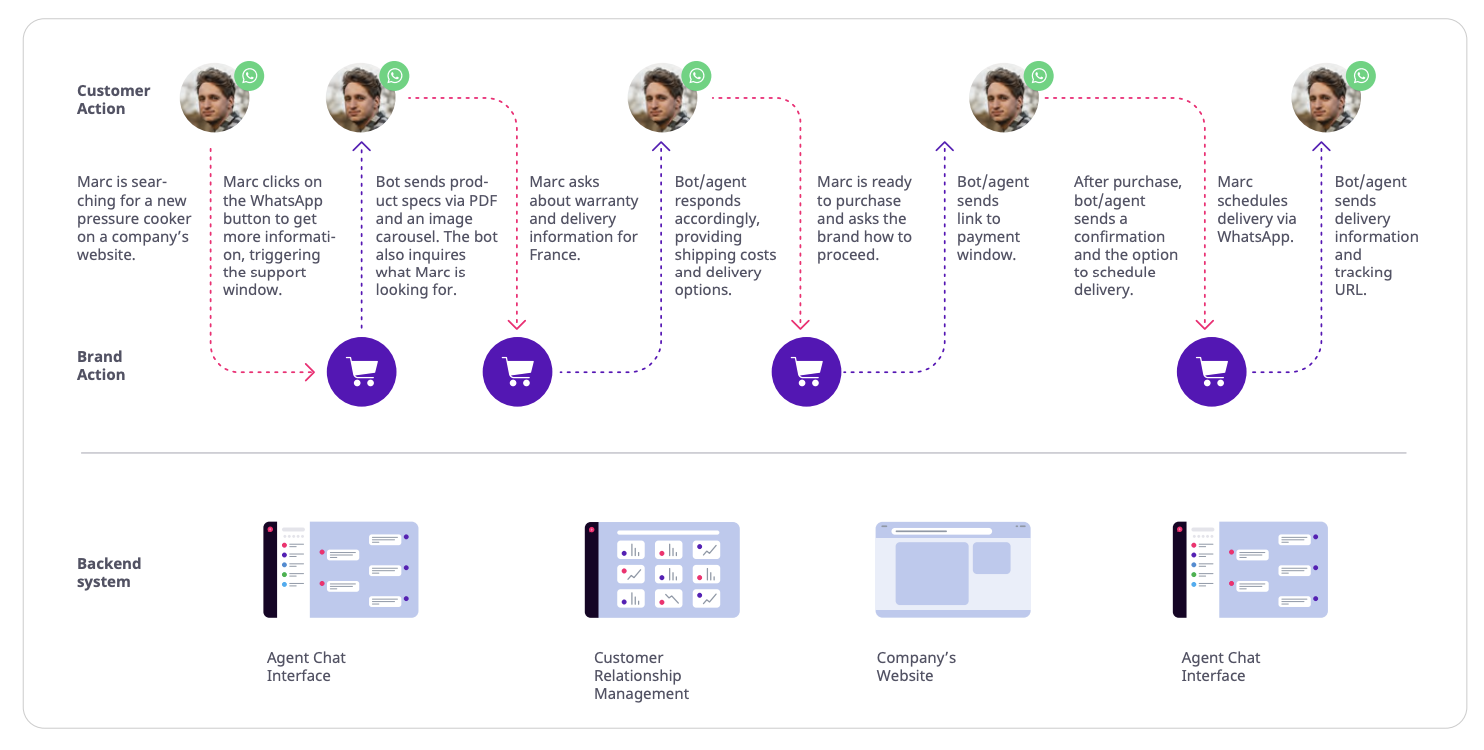
Below is a click-to-chat scenario, so you can see how easy it is from both the customer and the agent side. Here you’ll see how Marc goes from searching for a pressure cooker, through to the purchase and confirming a delivery date and time via WhatsApp.
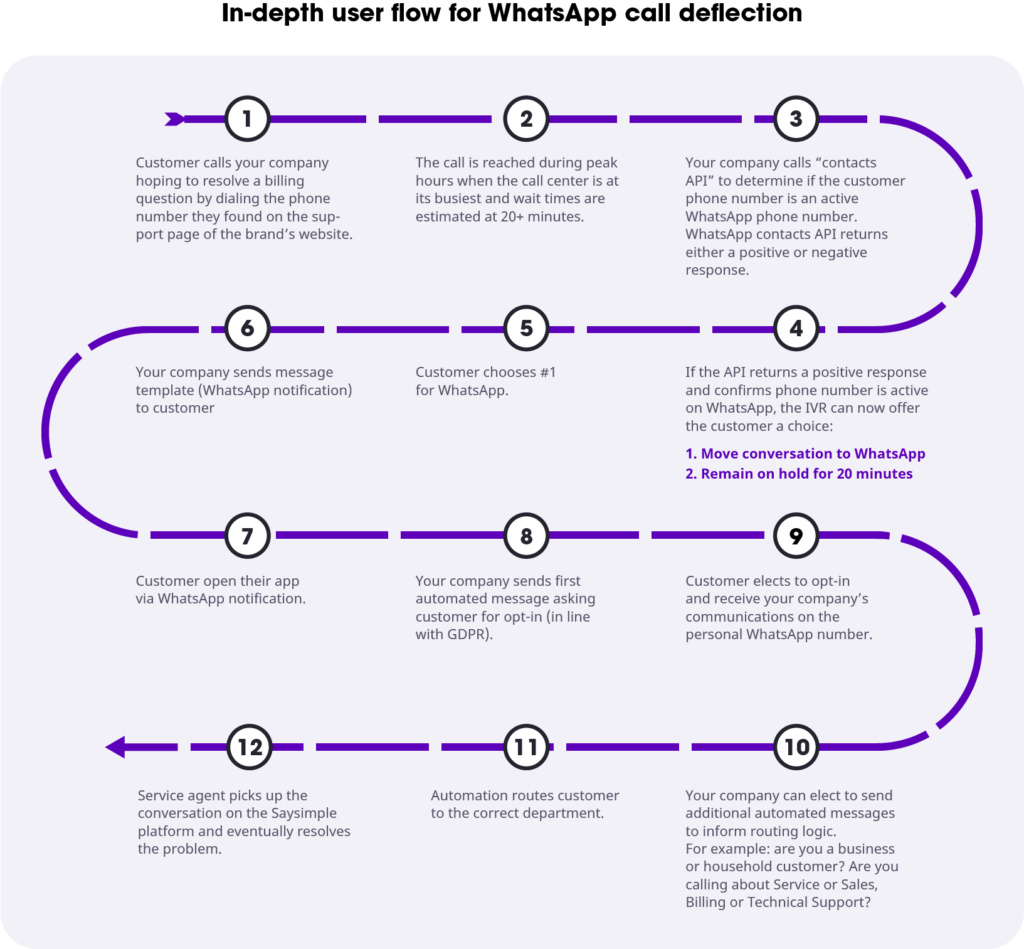
Known as call-to-messaging deflection, more and more brands are deploying call deflection with WhatsApp Business to enhance their customer support.
This means that companies reduce the number of calls that come into the customer care center and redirect them to alternative channels by introducing WhatsApp into their business. As a result, customer satisfaction increases and operational efficiency gets a boost. Critically, it also lowers admin costs, as customers are redirected from expensive voice channels to low-cost messaging channels they already use, such as WhatsApp.

The best way to add WhatsApp as a chat option on your website is by using a multichannel chat widget. With it, your customers can choose their favorite communication channel on your website: WhatsApp or another channel, such as live chat, Twitter, Facebook Messenger or Apple Business Chat. Now your customers can always contact you quickly via their favorite channel. On your end, the messages end up in one inbox, together with the other communication channels.
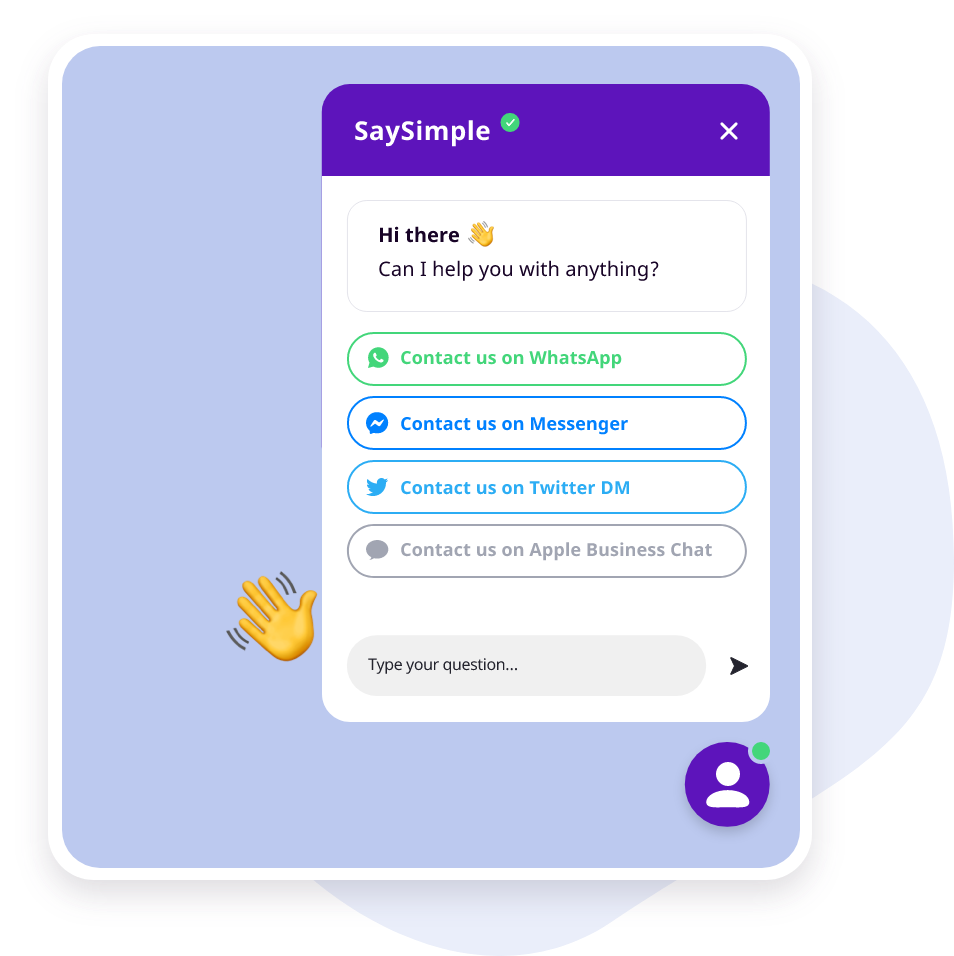
You get to keep a nice and clean overview without having to continuously switch channels.
Another way to build a WhatsApp entry point is by using click-to-chat ads, which are similar to the conversation starter buttons we mentioned earlier. They allow streamlined integration between Facebook advertising and WhatsApp Business. With ads that direct users to WhatsApp, you can add a Send Message button to your Facebook or Instagram ads that opens a conversation thread in, for instance, your Saysimple multichannel inbox. This way, customers can connect with your business on WhatsApp after clicking the button on your ad.
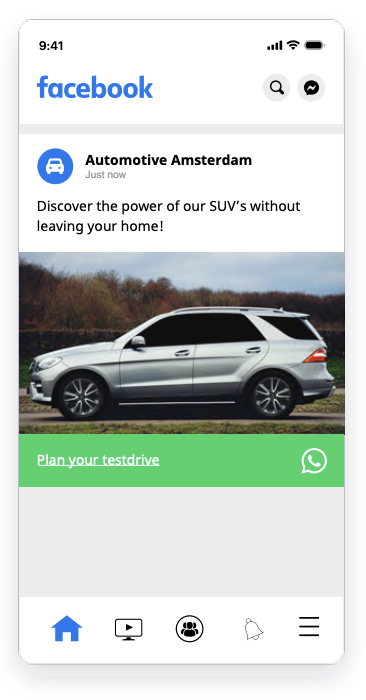
This combination of Facebook ads linked to a WhatsApp Business account gives marketers the ability to reach their target audience with a focused message and personalized follow-through via the largest chat app in the world. Click-to-chat ads are an easy way to use conversational marketing first-hand, linking from your Facebook ads and enabling your customers to discover your products and services with a solicited message.
“9 out of 10 consumers prefer using messaging to communicate with businesses and 56 percent would rather message customer service than speak on the phone. Chat apps have become a core communications channel. And WhatsApp, the world’s largest chat app, became the leader in powering these interactions.”
Now that you understand the strategy and specifics of WhatsApp Business, it’s time to think about two major steps: integration and rollout.
As mentioned at the start of this guide, small businesses can simply download WhatsApp Business. For medium to large businesses, however, the WhatsApp Business API needs to be integrated. Though it’s possible to integrate directly with WhatsApp, their strategy has been focused on working with official partners to deliver integration and services to enterprises across the globe. This means that every business has to go through an approval and business verification process to request access to WhatsApp Business.
At Saysimple, we are here to help you throughout the process of approval, onboarding, adoption and technical installation. With our officially supported messaging API, you’ll have access to a feature-rich, scalable and GDPR-compliant solution.
What we see is that many companies are still testing the waters. They look for ways to integrate without huge costs and developer investment, while also planning how to test and converse with customers via WhatsApp. What you need to consider is whether you prefer to keep the service in-house or have a third party run it for you.
Maintaining your own WhatsApp integration requires hosting, scaling, monitoring and even troubleshooting WhatsApp software clients and third-party databases in your own cloud infrastructure. An official provider like Saysimple takes care of all of that, eliminating the operational overhead of maintaining your own WhatsApp integration.
Taking this into consideration, let’s look at 3 ways you can integrate WhatsApp Business today.
You may prefer to keep WhatsApp conversations separate from your core systems. This is perfect for small businesses with fewer developer resources, where customer service is managed by one person. It’s a low-threshold way to get started with WhatsApp until your company matures enough to justify a deeper integration. If that’s the case, the best choice is to download the WhatsApp Business app for your company, without the need to integrate with the WhatsApp API.
For medium-sized companies there is the option to integrate WhatsApp Business into your customer management software with the provider’s API. With a WhatsApp Business account you can receive WhatsApp messages in a collaboration tool without having to integrate with the WhatsApp API yourself, which is perfect if your customer service team consists of multiple people.
If you want to access other customer data and functionality, the WhatsApp Business API can be integrated into your CRM, contact center, collaboration tools, ERP systems and more. Because the integration digs deeper into existing platforms, it allows for more speed and personalization: you can access a user’s data stored in the CRM and use it as the basis for the conversation. The Saysimple shared team inbox is a perfect example and lets you manage inbound and outbound WhatsApp conversations at scale.
Once you have integrated WhatsApp, it’s time to plan your rollout. Your customers expect your WhatsApp channel to work flawlessly, questions to be answered without delay and the content shared to be relevant. There may be a few hiccups (no rollout is ever perfect), but there are a few strategies we advise you to follow to avoid mishaps.
Once you have finished integrating the WhatsApp Business API with your internal systems and you are ready to start messaging with your customers over WhatsApp, test the channel with your team first.
Select a few test users to whom you want to roll out WhatsApp Business first. This will enable you to catch mistakes, questions and technical bugs that your team didn’t predict beforehand. For example, an external user may ask completely different questions from the ones you prepared for, prompting the creation of an entirely new conversation flow. When rolling out to a sample of your customer base, you may consider between 1 and 5% of your users.
While you expand your WhatsApp Business rollout to all of your users, you’re still in the learning phase and need to improve constantly. Depending on your capabilities, such as the number of staffed agents and available chatbots, you may consider a phased rollout.
Facebook and WhatsApp monitor activity on the platform. Here are a few tips to keep it running:
We kindly suggest that you make yourself familiar with WhatsApp’s policies in order to avoid having your message templates rejected.
Generally, this policy gives enterprises the framework for how WhatsApp operates. The main implication regarding message templates is that “advertising, marketing or promotional messages are not permitted, unless authorized by us (WhatsApp) in writing.” Find the complete WhatsApp Business Policy here: whatsapp.com/legal/business-policy
This policy states that “all messages and media related to your goods or services, including any descriptions, prices, fees, taxes and/or any required legal disclosures, constitute product listings. Product listings must comply with these policies, and applicable law and regulation.” Find a list of prohibited items and WhatsApp’s complete Commerce Policy here: whatsapp.com/legal/commerce-policy
WhatsApp monitors activity on the platform. Once they detect that a company has violated any of WhatsApp’s guidelines or policies, they reserve the right to limit or remove your business access.
Saysimple is a Software-as-a-Service (SaaS) company, revolutionizing the way companies get and stay in touch with their customers through new and emerging channels. Our customer communications management platform provides customer contact and marketing professionals with the technology they need to manage inbound and outbound customer conversations. We help our customers shift to effortless customer experiences on all channels and at every touchpoint in their customer journey.
With the officially supported Saysimple messaging API, you’ll have access to a feature-rich, scalable and GDPR-compliant solution. We guide you through the entire WhatsApp Business API approval, onboarding and adoption process, and the technical installation.
Our API can be integrated into any system you’re currently running. Alternatively, we offer a shared team inbox that gives you access to the WhatsApp Business solution without developer effort. The platform also lets you integrate other messaging channels. All in one screen.
Discover how Saysimple centralizes your customer communication, connects your teams, and automates processes.
Book a demo