



Summary
The WhatsApp Business API is Meta's connection that lets a company use WhatsApp from its own software, with multiple agents, automation and integrations. You don't download it like an app. You activate it by verifying your business with Meta and, usually, working with an approved provider. It isn't free: Meta charges for usage, and the provider charges for the platform.
TL;DR
- The WhatsApp Business API is Meta's official way to run WhatsApp from your own software, with several agents and systems connected. The free app is built for one phone, not a team.
- To activate it you need a business verified in Meta Business Manager, a phone number and, in most cases, a provider (a Business Solution Provider, or BSP).
- Costs come in two parts: the usage fees Meta charges by message type and country, and your provider's platform fee.
- The safest way in is one use case, one number, then expand in phases.
One salesperson answers customers from a personal phone. Another replies from the shared handset in the warehouse. When someone goes on vacation, their messages sit unread. And when the customer service lead asks how any of this connects to the CRM (customer relationship management, the system where you keep customer records), the honest answer is that it doesn't.
That is the moment a company stops needing the WhatsApp app and starts needing the API. This guide explains what the WhatsApp Business API is, how you activate it, what you can do with it and what it costs. You don't need to be technical to follow it.
What is the WhatsApp Business API?
The WhatsApp Business API is the channel Meta gives companies to send and receive WhatsApp messages from their own software, without depending on one phone. API stands for application programming interface: a connection between two programs. Meta calls the product the WhatsApp Business Platform.
It has no screen of its own. What your agents see comes from the platform that plugs into it. Think of it as a pipe. Customer messages flow through it into a shared inbox, a bot or your CRM, and your replies leave the same way, whether a person, an automated flow or an AI agent wrote them.
Today that connection runs on the Cloud API, which Meta hosts. The older On-Premises API, which companies had to install on their own servers, has been discontinued. If a guide tells you to install it, the guide is out of date.
WhatsApp Business App vs WhatsApp Business API
The app is free and built for one person, or a very small team, working from one phone. The API is built for teams: several agents on the same number, automatic replies and links to other systems. For a basic explanation of the app itself, see what WhatsApp Business is and how it works. This article stays on the API. Here is the short version.
| Where they differ | WhatsApp Business App | WhatsApp Business API |
|---|---|---|
| Built for | One person or a very small team | Teams, several locations, high volume |
| Agents | One main phone and a few linked devices | Many agents on the same number |
| Automation | Quick replies and an away message | Flows, bots and AI agents |
| Integrations | None | CRM, ERP and other systems |
| Access | Download from the app store | Through Meta and an approved provider |
| Cost | Free | Meta usage fees plus the provider's platform fee |
How does the WhatsApp Business API work?
It works in three layers. Meta provides the infrastructure, an approved provider provides the platform, and your company decides which conversations and which systems to connect. Activation almost always follows the same order.
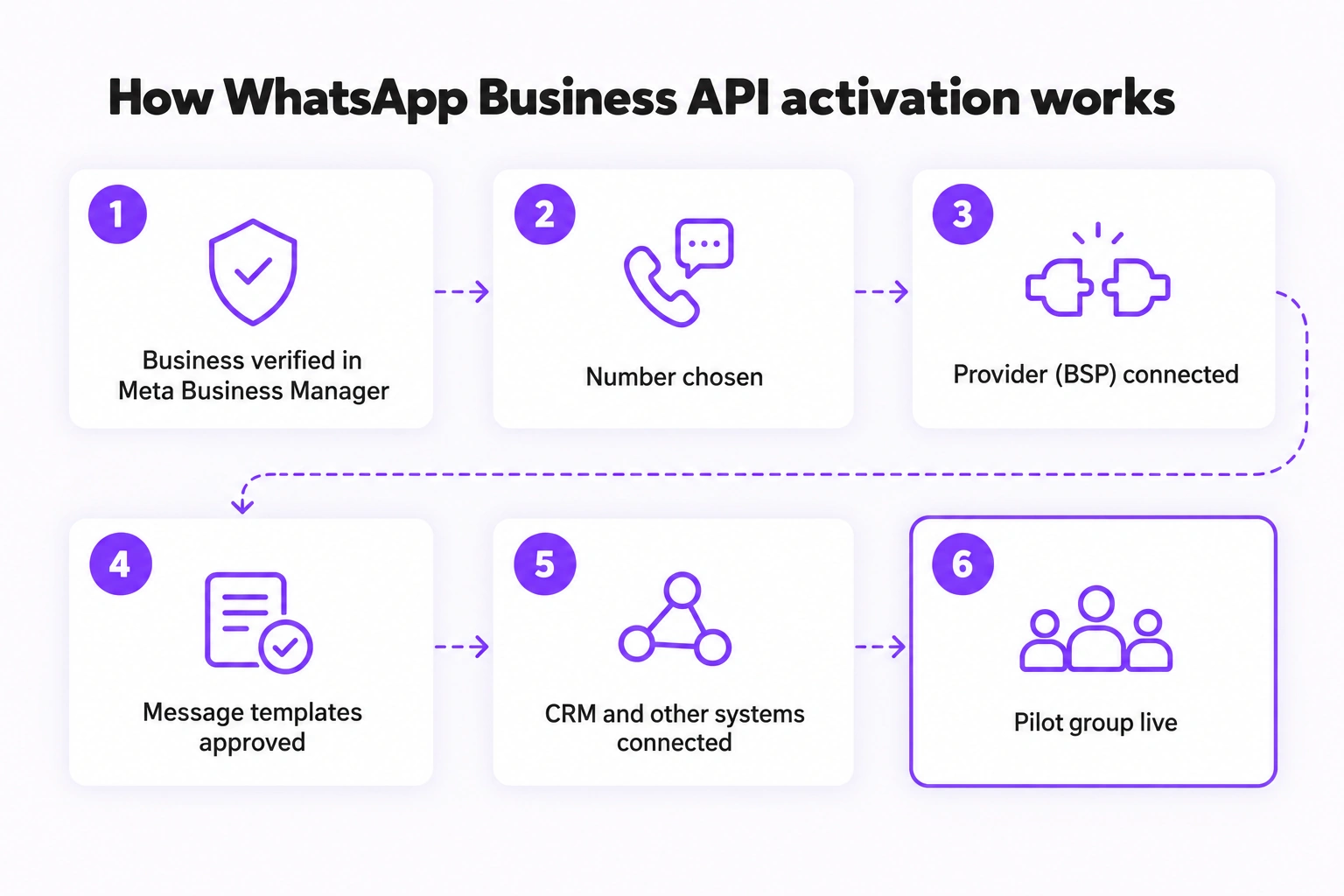
Verify your business in Meta Business Manager
The first step is paperwork, not code. You need an account in Meta Business Manager, the Meta tool where your company is registered. Meta checks that your business exists by comparing your details with official documents: legal name, address and registration number. A name or category that doesn't match your registration can slow the review down, so gather those details before you start. The timeline is set by Meta, not by your provider.
Choose the WhatsApp number you will use as well. Ask your provider whether that number can stay active in the app or has to be migrated, because it depends on how you connect it.
Choose a WhatsApp Business API provider (BSP) like Saysimple
A WhatsApp Business API provider, officially a Business Solution Provider (BSP), is a company Meta has approved to give access to the API and to build a usable platform on top of it. You can connect straight to Meta's Cloud API, but then your developers have to build the shared inbox, routing, template handling and reporting themselves.
Our recommendation: unless you have a dedicated development team, pick a provider before you touch Meta's API. Sending a message is the easy part. Everything that comes after it is where the work is. Saysimple is a B2B Commerce Customer Engagement Platform: omnichannel, built for WhatsApp Business and other channels, powered by AI and automation. Support and onboarding are available in English, Spanish and Dutch.
Know the messaging rules: the 24-hour window and templates
When a customer writes to you, a 24-hour window opens in which you can reply with free text. Outside that window you can only write with a message template: a text Meta has approved in advance, such as an order confirmation. The same rule applies in the Saysimple API, where starting a new chat means sending a template first. The customer care window is worth understanding before you plan any automation.
Connect your CRM and other systems
The last step is what turns WhatsApp into part of your operation. The platform connects to your CRM or ERP (enterprise resource planning, the software that manages orders and invoicing) so your team sees who is writing and which order is open. You can browse the available integrations, or build your own through a custom integration. For custom builds, the Saysimple API sends webhooks, automatic notifications to your system when a message is delivered or read, or when a chat is assigned.
What can you do with the WhatsApp Business API?
Multi-agent customer service
This is the use case that convinces most teams. BMN Building Materials, a Dutch builders' merchant with 85 branches, started with a pilot at one cluster of branches. Today all locations are reachable from one central number, and customers reach their preferred branch through a smart link. The BMN case study reports a 72% faster response time. That is one customer's result, not an average you should expect.
Several agents can work in one shared inbox with routing, so the right person picks up each conversation. That is omnichannel conversation management, with WhatsApp sitting next to email and web chat.
Automation with chatbots and flows
Repetitive questions like where is my order or do you have this in stock can be handled before a person gets involved, using flows, bots or AI agents, and handed to a human whenever needed. There is also WhatsApp call deflection: a customer waiting in your phone queue chooses to continue on WhatsApp instead.
Campaigns and broadcasts
With approved templates you can send updates and campaigns to customers who have given their consent (opt in). This is the area Meta watches most closely. If customers block or report your messages, your quality rating drops and your sending limits can drop with it. A few relevant messages beat many generic ones.
How much does the WhatsApp Business API cost?
It isn't free, and the cost has two parts. The first is what Meta charges for usage, which depends on the message category (marketing, utility, authentication or service) and the customer's country. The second is your provider's platform fee. From October 1, 2026, Meta also starts charging for certain service messages sent inside the 24-hour window, after the first 1,000 per number each month. We break that down in how WhatsApp Business API pricing works, and you can estimate your own volume with the WhatsApp pricing calculator.
| Cost layer | What it covers | Who charges it |
|---|---|---|
| Message usage | Marketing, utility, authentication and service messages, priced by country | Meta |
| Platform | Shared inbox, routing, automation, integrations and reporting | Your provider |
At Saysimple, the Grow plan starts at €139 per month (€119 with annual billing) and includes 3 users. Current prices are on the pricing page. To be fair to the alternative: if you only send a handful of messages a month and have a developer with spare time, connecting directly to Meta's Cloud API avoids the provider fee. For most teams, the time it takes to build the inbox and template handling costs more than the fee.
Which companies need the WhatsApp Business API?
There is no magic employee count. What matters is how many people handle WhatsApp and how much your business depends on the channel. You probably need the API if one of three things is true: more than one agent answers customers, you serve customers from several locations, or you want WhatsApp connected to your CRM or ERP and partly automated.
B2B companies with orders, deliveries and follow-ups, such as wholesalers, distributors and dealerships, fit that description naturally. A freelancer or a shop where one person answers every message will usually be fine on the free app.
How to get started with the WhatsApp Business API using Saysimple
Here is the order we would follow. It also works as a checklist you can hand to whoever owns the project.
- Pick one use case, for example order status questions, and one WhatsApp number.
- Gather your official company details: legal name, address and registration number.
- Verify your business in Meta Business Manager, with your provider's help.
- Write your first templates and submit them for approval, since approval is not instant.
- Connect your CRM or other systems, starting with the one your team opens most.
- Decide who answers what, set the routing rules and launch with a pilot group.
Our advice is to copy the phased approach BMN used: a pilot group, one use case, then expand once it works. The mistake to avoid is treating activation as a purely technical project. What weighs most is deciding who replies, with which templates and under which routing rules. The timeline depends mostly on Meta's verification, which no provider controls.
WhatsApp Business API FAQ
Can I use the API without a provider like Saysimple?
Technically yes. You can connect straight to Meta's Cloud API, but your developers then have to build the inbox, routing, template handling and reports. Most companies prefer a provider (BSP) that already offers all of that, with support. If you have free developers and low volume, a direct connection is a real option.
Is the WhatsApp Business API free?
No. Meta charges for usage by message type and country, and the provider charges a fee for its platform.
How long does activation take?
It depends mainly on Meta's business verification. With your documents ready and a guided onboarding, it can be a matter of days, but Meta doesn't guarantee timelines.
What size of company needs the API instead of the free app?
Size alone doesn't decide it. The API pays off when several agents answer, when you have more than one location, or when you need WhatsApp connected to your CRM or ERP.
Closing thoughts
The API is not a better version of the app. It is different: infrastructure. Companies that understand that early avoid rebuilding their setup a year later. The first concrete step is verifying your business in Meta Business Manager, and you can start that today without deciding everything else.
Want to see how it would look in your company? Request a WhatsApp Business demo with Saysimple and we will walk through your case together.
Sources
- Meta for Developers: Pricing on the WhatsApp Business Platform, for message categories, country rates and the October 2026 changes to service messages.
- Meta Business Help Center: Verify your business, for the business verification step.
- Saysimple API documentation, for template rules, supported channels and webhook events.



