


Summary
Your WhatsApp Black Friday plan needs two things: a campaign built on opt-in, templates approved by Meta and clear segments, and a support setup with a chatbot, shared inbox and routing. Get both ready before November 23 and the rush of messages won't overwhelm your team.
TL;DR
- To send offers you need each contact's consent (opt-in) and marketing templates approved by Meta.
- Split the campaign into four phases: list building, presale, Black Friday with Cyber Monday, and aftersales.
- A chatbot absorbs the repetitive questions and a shared inbox spreads the rest across your team.
- Meta charges per template message by category and recipient country, so work out the budget before you launch.
Black Friday lands on Friday, November 27, 2026, and Cyber Monday on Monday, November 30. For a sales or support team in Spain, those days start with an offer sent to a whole contact list and continue with a flood of messages asking the same things: is it in stock, how long does this price last, where is my order? The send is rarely the problem. The replies that come after it are, because every broadcast opens a conversation with someone who expects an answer in minutes.
This guide to WhatsApp on Black Friday follows that order: calendar, selling, support, Meta's rules, cost and measurement. It is written for B2B companies and online shops in Spain that already use WhatsApp Business or are about to start.
Why WhatsApp is the key channel on Black Friday for B2B companies in Spain
WhatsApp pairs instant reach with a two-way conversation: the customer gets the offer and replies in the same thread. On Black Friday, the channel that wins is the one where the purchase can close inside the conversation. An email sends the customer to a website and the dialogue ends there; on WhatsApp they can ask about stock, rates or delivery times and confirm the order without switching channels. In B2B it matters even more, because the buyer is usually a professional with recurring orders.
There is a catch: WhatsApp requires permission and approved templates, and a bulk email doesn't. If your email list is large and your WhatsApp opt-in list is small, email will still reach more people. WhatsApp makes up for it with the conversation, not with the volume.
The figures Saysimple publishes on its own website point the same way: an open rate of 80%, a conversion rate of 7% and a return on ad spend (ROAS) of 10x, according to the Saysimple Black Friday page.
WhatsApp Black Friday calendar 2026: a campaign plan in phases
A phased plan keeps you from improvising during the week of November 23 and prepares your team for the demand peaks. The dates are approximate, so adjust them to your own stock and team.
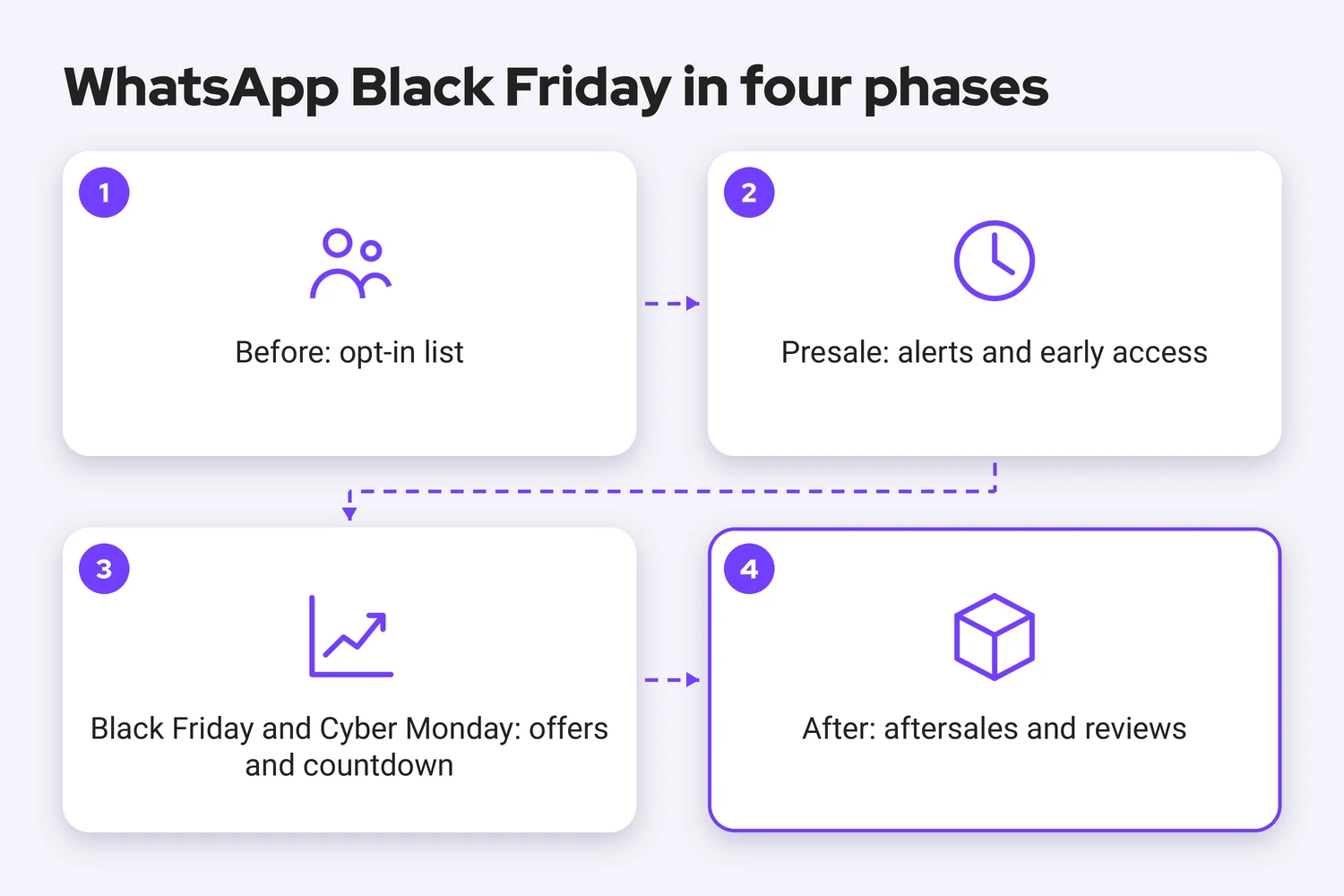
Before: build your list with opt-in
From now until November 15, ask for permission at every touchpoint: a checkbox at checkout, a QR code at the counter or a welcome message asking whether the customer wants to receive offers. Meta recommends an opt-in that covers the types of messages you will send, plus a clear way to opt out. If you are short on time, start with the contacts who already wrote to you, and submit your templates for approval as early as you can.
Presale: alerts and early access
From November 16 to 22, say what is coming and when. A short template with the date and a quick-reply button gives you a warm segment for Friday. Early access works well in B2B, because your regular buyers see the offer and the availability before the general launch.
Black Friday and Cyber Monday: offers and countdown
Send the main offer on Friday, November 27, in the morning and a reminder with a countdown on Monday, November 30, which can be your whole Cyber Monday plan. We recommend no more than two marketing messages per contact over the weekend: every extra send raises the risk of blocks, and blocks hurt the quality rating of your number.
After: aftersales and reviews
From December 1 to 7, the useful messages are transactional: order confirmation, shipping notice and delivery. A few days after delivery, ask for a review. It is also the moment to see who bought and who only asked, the best segment for your next campaign.
How to sell on WhatsApp on Black Friday
Selling on WhatsApp comes down to three decisions: who you write to, which template you use and what you do with the people who don't buy.
Segment your contacts
Segmentation is what separates a useful broadcast from an annoyance. Split your list by purchase history, customer type (distributor, reseller, end customer) and, if you sell across regions, by location. Each message then reads as if it was written for the person receiving it.
Datamars UK shows what a narrow campaign can do: the livestock equipment supplier messaged 400 contacts to clear slow-moving stock and reported a 300% ROI on sales over one weekend, according to its published Datamars UK case study. That is the result of a single campaign, not an average.
Marketing templates that comply with Meta
Any message you send first, or after the 24-hour customer service window has closed, has to be an approved template. Offers fall under the marketing category, while order confirmations and shipping notices are utility. Keep each template short: who you are, the offer, the deadline and a button. For example:
Hi {{1}}, early access to {{2}}'s Black Friday offers opens on Monday. Want to see them before anyone else? [Yes, notify me] [No, thanks]
Submit your templates for approval well before November 23. You can build and send them with Saysimple's WhatsApp Broadcasting.
Recover abandoned carts
Meta's own pricing documentation lists a cart abandonment reminder as a marketing template. To send it you need the customer's opt-in and a connection between your shop or CRM and the WhatsApp API. Send one reminder a few hours later and stop there: a second one starts to feel like pressure.
How to handle customer service without collapsing during the peak
You handle the peak when a chatbot answers the repetitive questions, the rest reach your team in an orderly way, and customers know when to expect a reply.
A chatbot for repetitive questions
On Black Friday the same questions repeat: stock, delivery times, returns, order status and invoices. A WhatsApp chatbot answers them instantly and hands the conversation to a person when it can't. Build it before the campaign and test it with your own team first. You can design the conversation flows with Saysimple's Flow Builder.
Shared inbox and routing by team
When several agents share a single number, a shared inbox shows who is handling which conversation and keeps the history in one place. Route by topic: sales questions to the commercial team, order status to logistics, invoices to administration.
Away messages and response expectations
Set an automatic message for outside business hours and for peak moments, with a realistic response time. Promising a reply within 30 minutes and missing it costs more trust than promising the same day and delivering.
Stay within Meta's rules: opt-in and messaging policy
Meta's WhatsApp Business Messaging Policy says you may only contact people on WhatsApp if they have given you their number and their permission (opt-in) to receive messages from you. You are responsible for how you collect that opt-in. Keep a record of when and how each contact gave it, ask for it by message type and make opting out as easy as opting in. In Spain, have your legal advisor check the wording against data protection rules (GDPR) and the Spanish law on electronic commercial communications (LSSI).
How much does it cost to send your WhatsApp campaigns
Your cost has two parts: what Meta charges per message and the license of the platform you use. Since July 1, 2025, Meta bills per message, by category and recipient country, and only for messages from businesses to users.
| Item | Who charges | How it is calculated |
|---|---|---|
| Marketing templates (offers, abandoned carts) | Meta | Per message, depending on the recipient's country |
| Utility templates (order confirmations, shipping notices) | Meta | Per message, depending on the country, with volume tiers |
| Service messages (replies inside the 24-hour window) | Meta | The first 1,000 per month per number are free, then billed like a utility message |
| Messages customers send you | Meta | Not charged |
| Platform license | Saysimple | From €119 per month, according to the pricing page |
To estimate your own campaign, use Saysimple's WhatsApp pricing calculator; Meta's published rate card remains the reference for exact amounts per country.
If you want the chatbot ready without building it from scratch, there is a time-limited offer: from November 23 to 30, 2026, new customers who sign up for Saysimple Grow on an annual plan get six months of the WhatsApp chatbot free, plus setup and personalized training. The details are on the Saysimple Black Friday page.
To get started on time, you need six things:
- A WhatsApp Business API number connected to a platform that supports several agents.
- A documented opt-in for every contact you plan to message.
- Templates submitted and approved before November 23.
- A chatbot tested on your five most frequent questions.
- A routing and shift plan for November 27 and 30.
- A payment method set up in your Meta account, so service messages keep being delivered now that they are billable.
How to measure your campaign results
Measure in the order of the conversation: delivered and read messages (your open rate), replies and button clicks, and orders linked to the campaign. On the support side, track first response time and how many conversations the chatbot resolved without an agent. Watch opt-outs and blocks: if they climb after a send, your message or your frequency needs work. Decide the metrics before the campaign starts and compare against your last promotional campaign, not against an ordinary week.
Frequently asked questions about WhatsApp on Black Friday
Can I send Black Friday offers on WhatsApp to any customer?
No. You need the consent (opt-in) of each contact and you have to use marketing templates approved by Meta.
When should I start preparing the campaign?
As soon as possible. If you're cutting it close, prioritize the contacts who already gave you opt-in and switch on a chatbot to absorb the questions.
Do I need the WhatsApp Business API?
Yes, if you want several agents to handle conversations, send broadcasts or automate replies.
How much does it cost to send a campaign?
Meta charges per template message according to its category and the recipient's country, on top of the platform license.
Ready to reach Black Friday with WhatsApp prepared?
A WhatsApp Black Friday plan works when selling and support are prepared together: a strong campaign with no team behind it only moves the pile-up from your sales funnel to your inbox.
Saysimple is a B2B Commerce Customer Engagement Platform: omnichannel, for WhatsApp Business and other channels, powered by AI and automation. Support and onboarding are available in English, Spanish and Dutch. To see how this plan works with your own numbers and team, request a Saysimple demo or look at the Black Friday chatbot offer.
Sources
- WhatsApp Business Messaging Policy: Meta's rules on opt-in and who you may contact.
- Pricing on the WhatsApp Business Platform: per-message billing by category and market, and the free monthly service messages.
- Saysimple Black Friday page: Saysimple's own figures (80% open rate, 7% conversion rate and 10x return on ad spend).
- Datamars UK customer story: the 400-contact campaign and the 300% ROI on sales.



