


Companies invest heavily in advertising on Meta and Instagram to generate new leads. Still, a large portion of these leads is lost because follow-up happens too late or remains manual. By automating follow-ups and lead qualification through WhatsApp flows, you can approach leads directly, qualify them faster, and pass them on to sales more efficiently.
Summary
Companies that advertise on Meta and Instagram often lose leads because follow-up is slow or manual. By connecting Meta Lead Ads to a WhatsApp workflow, new leads receive a personalized WhatsApp template almost immediately, can qualify themselves through interactive buttons, and are automatically routed to sales, speeding up follow-up, qualification, and internal handoff.
TL;DR
- WhatsApp automation speeds up follow-up, qualification, and internal handoff for leads generated through Meta and Instagram ads.
- WhatsApp templates are pre-approved messages sent outside the standard 24-hour conversation window, personalized with variables and interactive buttons.
- Meta Lead Ads connects to a Saysimple WhatsApp workflow via Zapier and a webhook, triggering a personalized message the moment a lead submits a form.
- Based on a lead's button responses, the workflow automatically qualifies them and routes them to the right sales employee.
What are the benefits of WhatsApp automation for Meta leads?
By combining WhatsApp templates and automation, an efficient workflow for lead follow-up is created.
- Faster follow-up of new leads: New leads receive a personalized message via WhatsApp almost immediately. With pre-set templates, you can automatically respond to requests from Meta Lead Ads, increasing the chance that a lead is still actively engaged.
- Faster qualification of new leads: With interactive buttons in WhatsApp, a lead can immediately indicate what they are looking for, such as more information, a quote, or a demo. Based on these responses, the lead can be qualified automatically.
- Faster internal processing: Once a lead has been qualified, it can automatically be created in the CRM and assigned to an employee within the Saysimple inbox. This allows sales to follow up immediately without first having to gather data manually.
Curious how this works? Below, we explain it.
What are WhatsApp templates and when do you use them?
WhatsApp templates are pre-approved messages that businesses can send to customers via the WhatsApp Business API outside the standard 24-hour window.
When a customer responds to a message, a 24-hour conversation window opens in which your business can freely send messages. Once this window expires, you can only contact the customer again by using a pre-approved WhatsApp template.
Templates are often used for:
- Lead follow-up
- Appointment confirmations/reminders
- Notifications or updates
- Marketing or service messages
How do you personalize WhatsApp templates for lead follow-up?
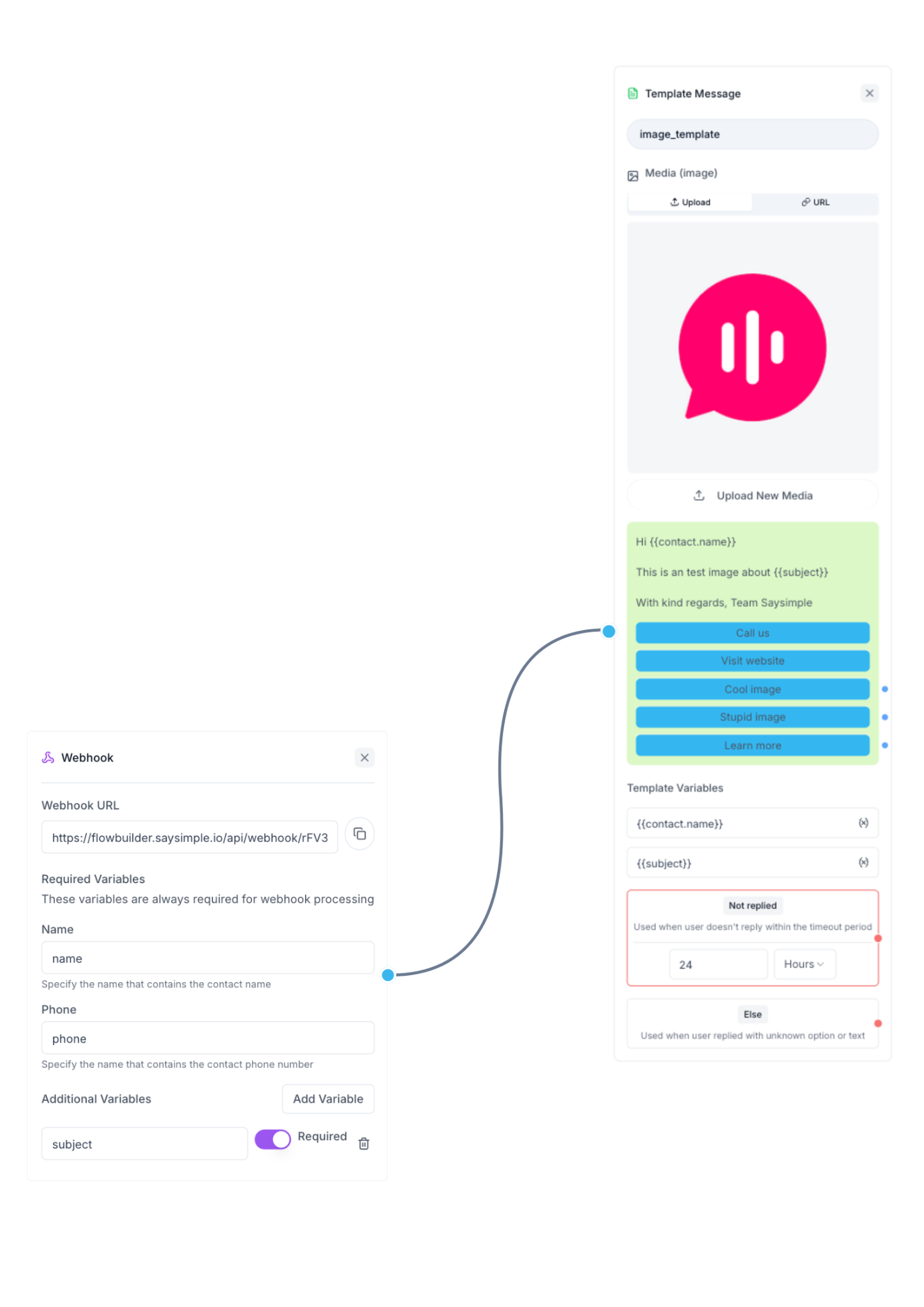
Although WhatsApp templates are pre-approved, that does not mean messages have to feel impersonal. WhatsApp templates can be fully tailored to the way you want to communicate with customers. Within the Saysimple workflow, it is clearly visible what the message will look like when it is ultimately sent to the lead.
A WhatsApp template consists of several components. At the top, a media file can be added, such as an image, video, or document. This helps provide immediate context to the message, for example by showing a product, service, or brochure.
Below the media file is the message text. In this text, various dynamic variables can be used, such as the name of the lead or other details collected through the Meta Lead Ads form. This makes the message feel personal and relevant to the recipient.
In addition, interactive buttons can be added. Call-to-action buttons can link to a website or phone number, and reply buttons can be used to collect customer responses. Based on the choice a lead makes, a follow-up message can automatically be sent, or the workflow can continue to the next step in lead qualification.
In this way, an interactive and personal conversation is created, while follow-up and qualification remain fully automated. In addition, it is possible to escalate to an employee at any time, including earlier in the process when needed.
How do you connect Meta Lead Ads to a WhatsApp workflow?
By connecting Meta Lead Ads to a WhatsApp workflow, you can automatically approach new leads as soon as they fill in a form.
This connection ensures that lead data from the Meta Lead Ads form is automatically sent to the workflow, after which a personalized WhatsApp template can be sent immediately.
The workflow starts with a Webhook, which is equivalent to sending a WhatsApp template. As soon as a new lead comes in, a personalized WhatsApp message is automatically sent to the lead.
Connecting with Zapier
Zapier is used to connect Meta Lead Ads. Within Zapier, the automation can be set up in two steps.
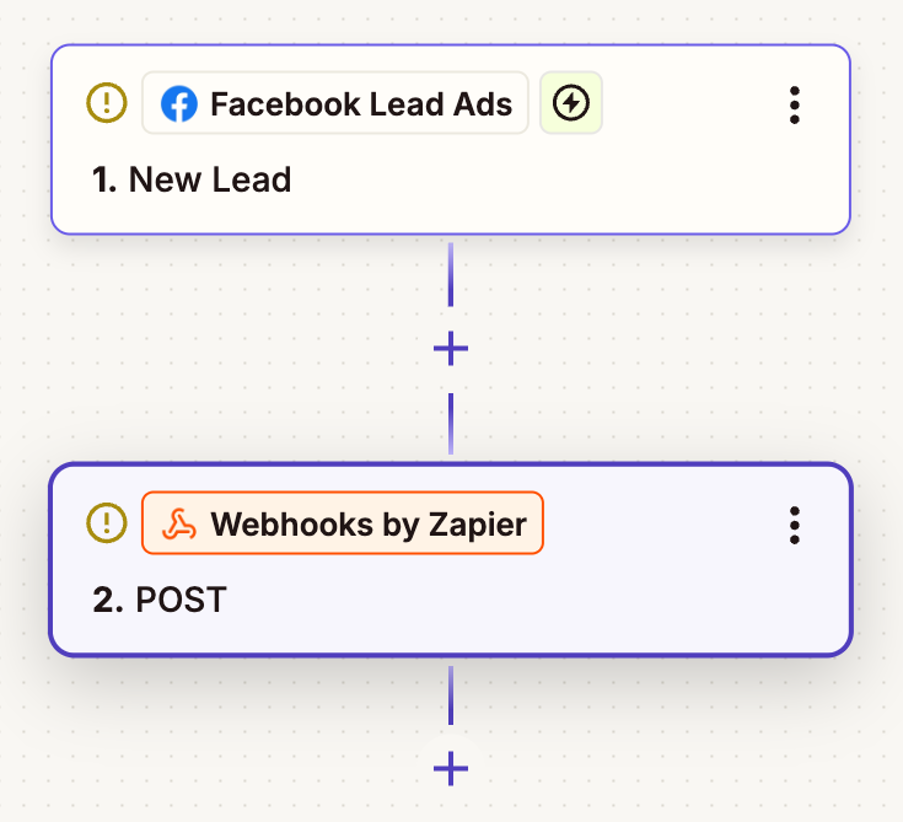
- Trigger = a new lead from Meta Lead Ads + the correct form
- Action = a POST request to the Webhook of the Saysimple Flow Builder.
Setting up the Webhook for the Saysimple workflow
Finally, the webhook is linked to the Saysimple workflow. Below, we have outlined the steps for you:
- Action event = POST
- URL = Saysimple Webhook URL
- Payload type = JSON
- Data = Name, phone number, and more. (Add these as separate fields and link them to the corresponding data from your Meta Lead Ads form, such as name, phone number, etc.)
Body payload: “Name” and “Phone” are required variables to trigger a Webhook flow in Saysimple. In addition to these variables, you can also optionally pass extra variables, so you can reuse this information in later messages or use it in your WhatsApp workflow through “splitting based on variables.”
How does lead qualification via WhatsApp work in practice?
Lead qualification via WhatsApp works by automatically asking leads follow-up questions and determining the right next step based on their answers.
When a lead enters the WhatsApp workflow through Meta Lead Ads, a personalized WhatsApp template is automatically sent. In this message, the lead can immediately indicate where their interest lies, such as more information, a quote, or a demo. Interactive reply buttons make it easy for the lead to quickly make a choice, which lowers the threshold to respond.
Based on this response, the workflow can automatically determine the next step. This allows a lead to be qualified further immediately, receive additional information, or be routed to the right employee. In this way, lead qualification via WhatsApp becomes faster and more structured, while sales immediately has the right context to follow up.
Discover the possibilities for your business
By connecting Meta Lead Ads to the WhatsApp workflows of Saysimple, you can follow up on leads faster, qualify them better, and route them to sales more efficiently.
Curious what Saysimple can do for your organization? Schedule a demo and discover the possibilities.
FAQ
What are Meta Lead Ads?
Meta Lead Ads are lead forms within ads on Meta platforms, such as Facebook and Instagram, that allow companies to collect contact details from potential customers directly.
Why use WhatsApp for lead follow-up?
WhatsApp enables fast and direct follow-up. This increases the chance that a lead is still actively engaged and can be qualified more quickly.
What are WhatsApp templates?
WhatsApp templates are pre-approved messages that businesses can send through the WhatsApp Business API outside the standard 24-hour window.
How does lead qualification via WhatsApp work?
With interactive buttons and automated workflows, a lead can immediately indicate where their interest lies. Based on that response, the workflow automatically determines the right next step.
Can you connect Meta Lead Ads to a WhatsApp workflow?
Yes, by connecting Meta Lead Ads to a WhatsApp workflow, you can automatically send new leads a personalized message and start lead qualification right away.
What is the benefit of automation for sales?
Automation enables faster follow-up, less manual work, and more context for sales, so leads can be followed up more efficiently.



